
Table of Contents
- 1 Retention & Completion
- 2 Pricing (Plans and Data Caps)
- 3 Rollover Data
- 4 Free Trial & Money-Back Guarantee
- 5 Special Offers & Bonuses
- 6 Access Speed
- 7 Server Connections / Configuration
- 8 Provided Newsreader / Web Interface
- 9 Support Review
- 10 Payment Options
- 11 Final Thoughts – Who Is Easynews For
- 12 Conclusion – We Recommend Easynews
Easynews is a veteran Usenet provider (est. 1996) that stands out for its unique web-based Usenet interface. Unlike traditional services that require third-party newsreader software or NZB indexers, Easynews lets you search, preview, and download content directly from your web browser. This all-in-one approach makes Usenet accessible from any device with no extra software – a major selling point for beginners and casual users. For example, you can log in on a phone or laptop and instantly search 120,000+ newsgroups via a simple web portal. Easynews automatically assembles multi-part binaries and even provides thumbnail previews (for images/videos) right in the browser. It essentially turns Usenet into a searchable online library, living up to its name by simplifying what can be a complex process.
That convenience does come with trade-offs. Easynews uses metered data plans (GB limits) for its web interface usage, unlike competitors like Newshosting or UsenetServer which offer flat-rate unlimited downloads. While Easynews now includes an “Unlimited NNTP” option (for traditional newsreader access) on all plans, heavy downloaders might find the base data caps restrictive or the service pricier than classic providers. In essence, Easynews is aimed at those who value ease-of-use and integrated search over raw volume. Experienced users can still leverage Easynews’s backbone with their own apps (SABnzbd, NZBGet, etc.), but the service truly shines when used as intended – through its polished web UI. In the sections below, we’ll explore retention, speed, pricing, and how Easynews compares to rivals, with a seasoned yet slightly skeptical eye on its claims.
Retention & Completion
Easynews offers industry-leading binary retention – currently over 6,445+ days of posts are available. This is one of the largest Usenet archives in the world, on par with top providers like Newshosting and UsenetServer. In practical terms, you can retrieve files and discussions dating back to around 2008 or earlier. Such deep retention is a double-edged sword: it significantly expands what you can find (great for niche or older content), but it also tests a provider’s completion rates. Easynews performs admirably here – completion is excellent (≈99% across most binaries) thanks to constant upkeep of their servers and storage. The provider continuously adds storage to grow retention, and maintains multiple redundant server farms to ensure articles remain available.

Pricing (Plans and Data Caps)
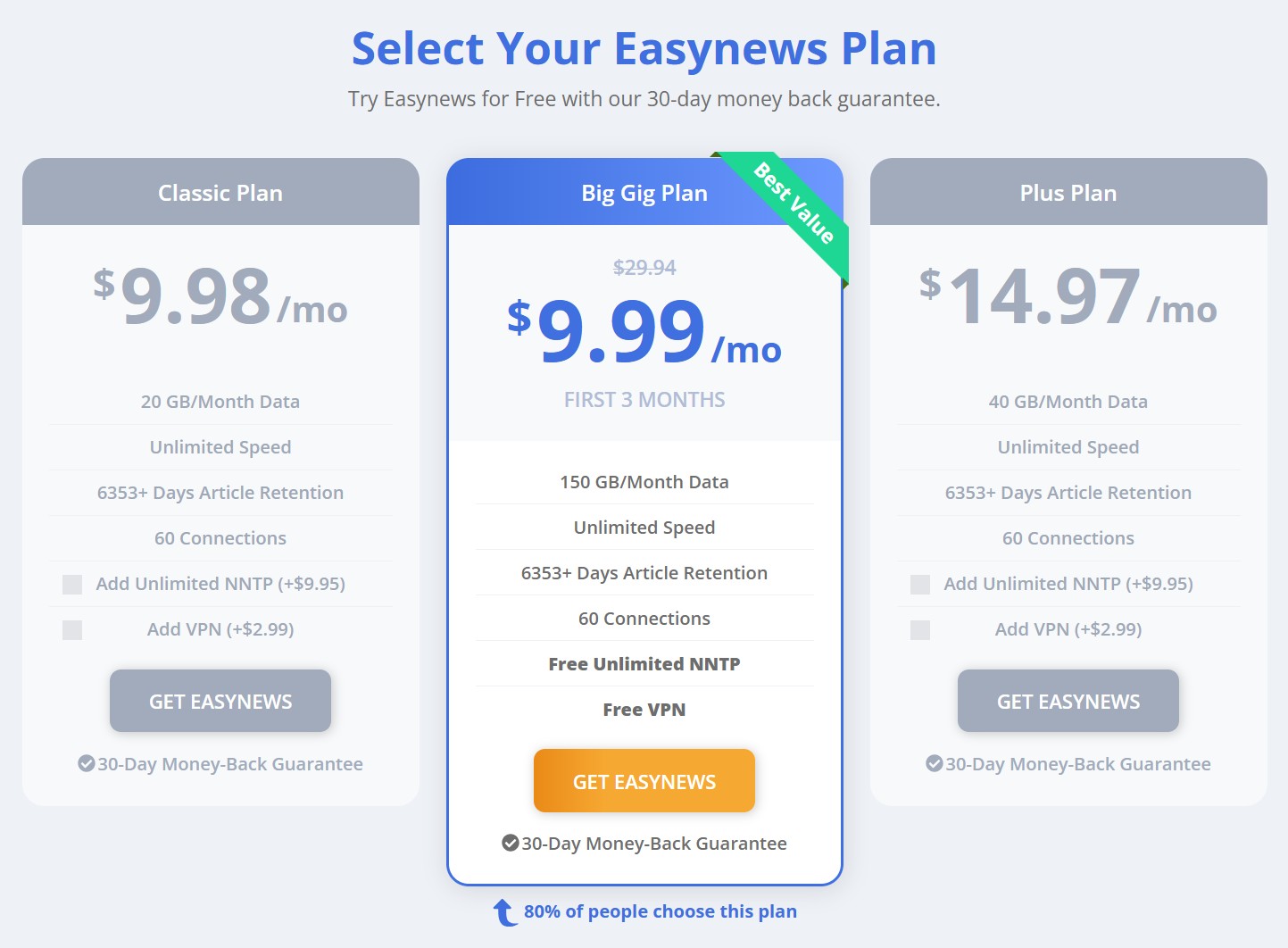
Easynews offers three main subscription plans, each with a monthly data allowance for web-based Usenet access. The plans and their standard rates (as listed on Easynews’s site) are:
- Classic Plan – $9.98 per month, includes 20 GB of data each 30-day billing cycle. This is the entry-level plan for light usage. Unused data can roll over up to 500 GB max.
- Plus Plan – $14.97 per month, with 40 GB of data per month. Rollover cap is 1,000 GB. Good for moderate use.
- BigGig Plan – $29.94 per month, with 150 GB of data per month. This high-tier plan allows rollovers up to 3,750 GB. It’s marketed as the “best value” for heavy users.
All plans come with unlimited speed and full retention access – the differences are in included data and perks. Importantly, Easynews includes two key add-ons in the BigGig plan: Unlimited NNTP and VPN service at no extra cost. The lower Classic/Plus plans do not include these by default, but you canadd them: Unlimited NNTP access for +$9.95/mo, and VPN for +$2.99/mo. We’ll discuss those features in dedicated sections, but factor these costs in if you need them on smaller plans. For example, a Classic user who wants unlimited external newsreader downloads and a VPN would end up paying about $22/month ($9.98 + $9.95 + $2.99). At that price, it might make sense to just upgrade to BigGig ($29.94) for 150 GB web data plus the extras included.
Easynews pricing is considered premium in the Usenet market. In pure dollars-per-byte, it’s higher than traditional unlimited providers. For instance, Newshosting’s unlimited plan can be around $10–$15 monthly (often with promotions) for unlimited data, and UsenetServer similarly offers unlimited downloads in the ~$10 range (on yearly plans) with no data caps. By contrast, Easynews’s base $9.98 only gets you 20 GB before you’d need to purchase more or throttle usage. This premium is the cost of Easynews’s unique features and convenience. You’re essentially paying for the integrated search and web platform – something competitors don’t provide – in addition to raw Usenet access.
Rollover Data
Rollover data does help cushion the caps: any unused GB in your monthly allotment carry over to the next month (up to the rollover limits listed above). So if you don’t use Easynews heavily every month, over time you can accumulate a buffer (called the “Gig Bank”). For example, a Plus user might eventually stockpile a few hundred GB during slow months, then splurge in a busy month without overage fees. It’s a nice perk that rewards sporadic usage patterns. Additionally, Easynews has a Loyalty Gigs program: after 1 year of continuous subscription, they start adding extra free gigs to your account each month (1 GB extra per year of service, up to 12 GB/month max after 12 years). While not a reason alone to subscribe, it’s a nod to long-term customers that effectively increases your data allotment over time.
Overall, the pricing structure makes Easynews a better fit for certain users (more on that in Final Thoughts). If you need **unlimited downloads 24/7**, a metered Easynews plan by itself may not be cost-effective – you’d likely prefer a flat-rate provider like Newshosting or UsenetServer. However, if you’re a moderate user or primarily do on-demand searches, Easynews’s plans can be quite sufficient. It’s also worth watching for special promos: Easynews frequently runs sales for new customers. At the time of writing, they offer the BigGig plan at $9.99/mo for the first 3 months (a huge discount) before it returns to $29.94. Such deals can bridge the price gap, at least initially. Just be sure you’re aware of the regular rates once any promo period ends.
Free Trial & Money-Back Guarantee
Easynews does not provide a no-credit-card free trial with limited data (as some competitors do), but they effectively offer a **risk-free 30-day trial** via their money-back guarantee. All plans come with a “30-Day Money-Back Guarantee” for new customers. This means you can sign up, use the service fully for up to 30 days, and if you’re unsatisfied for any reason, you can cancel and request a full refund. Easynews explicitly states “no questions asked” on refunds within that window, which is reassuring.
In practice, this guarantee serves as a free trial: you do have to enter payment details and activate a subscription, but you won’t be out of pocket if you decide to back out within the first month. We recommend keeping an eye on that 30-day mark and making a decision before it lapses, as you’ll be charged normally after day 30. Also note that if you exceed your plan’s data allotment during the trial month, Easynews might charge for additional usage or upgrade you, so stay within your base limit while evaluating.
There’s no *per se* “free tier” or freemium offering beyond this refund policy. Easynews used to occasionally advertise small trial accounts (e.g. 10 GB for a few days) in the past, but currently the approach is to let you test the full service with the safety of the money-back guarantee. This is fairly standard among premium Usenet providers today – many have shifted from short trials to longer refund periods to ensure users can truly test retention, speed, and features. Easynews’s 30-day guarantee is on par with industry leaders (Newshosting, for example, also offers a 30-day money-back period on its deals).
Special Offers & Bonuses
Beyond the occasional introductory discounts for new users, Easynews has some ongoing perks that add value:
- Periodic Sales: Easynews is known to run holiday sales (Black Friday, Cyber Monday, etc.) and seasonal promotions. These can be quite steep – for instance, past deals have included a year of service at significant discounts or bonus months free. If you’re considering signing up, it’s worth checking around major sale events for any coupon codes or promo links. (Just be sure to use the official site’s pricing after the promo; avoid outdated “too good to be true” links.)
- Loyalty Gigs: As mentioned in Pricing, long-term subscribers earn extra gigabytes each month at no charge. After one year of continuous service, you get +1 GB every month; after two years +2 GB, and so on, up to +12 GB/month bonus after 12 years. It’s a slow burn, but it’s a unique reward for loyalty that many reviews gloss over. If you stick with Easynews for the long haul, your plan’s effective data limit will gradually grow without any price increase.
- Rollover Gig Bank: Unused data rolls over month-to-month, up to a cap (500 GB on Classic, 1000 GB on Plus, 3750 GB on BigGig). This isn’t an “offer” per se, but it’s a feature that effectively gives you more flexibility than the raw plan GB might suggest. In slow months you’re banking data for later. Many competing services simply reset your quota each month (if they even have quotas), so rollover is a nice touch for Easynews’s metered model.
- Referral Program: Easynews has a refer-a-friend system where you can earn bonus gigs for getting others to sign up. Details aren’t prominently advertised on the main site, but historically they’ve given something like 10 GB or more per referral. If you have friends interested in Usenet, this can be a way to offset your own usage costs by expanding your gig bank.
One thing to note is that Easynews has discontinued some older promotions, such as the “World Community Grid” project for earning free gigs (this was a scheme where running a distributed computing client earned you data credits). As of 2026, the main ways to get bonus data are loyalty gigs and referrals. Also, while Easynews bundles a VPN in its top plan (and as an add-on), they sometimes partner with VPN providers for combined deals. For example, in the past they’ve offered a package of unlimited Usenet + VPN at a discounted combo price. If privacy is a priority, watch for those bundle offers.
In summary, Easynews’s special offers tend to sweeten the deal, but they don’t fully hide the fact that it’s a premium service. The loyalty and rollover programs are genuine benefits – they encourage you to stick around and not feel like unused allowance is wasted. However, these extras mostly add *data*, not *features*. The core product (web Usenet with search) remains the main reason to choose Easynews, and the promotions are icing on the cake. As a savvy user, take advantage of them, but also evaluate Easynews on its own merits for your needs.
Access Speed
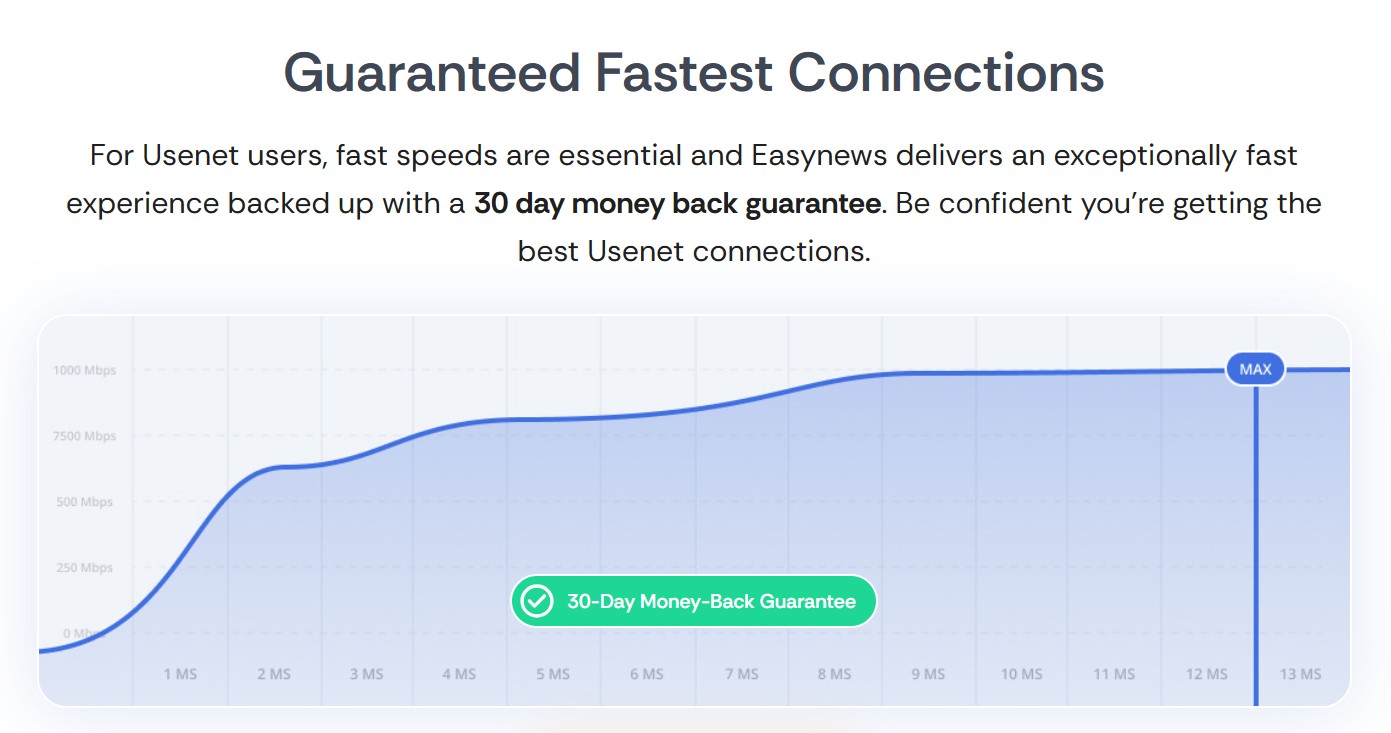
Easynews advertises “unlimited speed” on all plans, and in real-world use the service is indeed very fast. There are no throttling or speed caps imposed by Easynews – the only limits are your own internet bandwidth and how efficiently your device can handle downloads. In speed tests, Easynews consistently maxes out consumer connections. For example, in one independent test a 1.2 GB file download averaged about 7.1 MB/s on a 64 Mbps line, essentially saturating the connection. On gigabit fiber, power users report being able to pull hundreds of Mbps (or 50+ MB/s) without issues, especially when using multiple connections.
One reason Easynews can keep up with high speeds is that it operates on a Tier-1 Usenet backbone with servers across North America and Europe. Easynews has clusters of servers in the US (East and West coast) and in the EU (Netherlands), and even offers a geolocated server address that automatically connects you to the nearest cluster for optimal latency. This global presence means whether you’re in California or London, you can get a local speed boost. The network is engineered with plenty of redundancy and peering agreements – Easynews directly peers with major ISPs to reduce routing hops. In plain terms, they try to ensure the data path between you and their server is as short and uncongested as possible. Fewer bottlenecks = faster, more reliable throughput.
Easynews supports up to 60 simultaneous connections per user. In practice, you rarely need that many – even 10–20 connections can saturate most home internet lines. But the high cap is useful for power downloaders or those on ultra-fast broadband, allowing them to squeeze every drop of speed by parallelizing requests. Competing services vary in this limit: UsenetServer, for instance, allows 20 connections on its plans, while Newshosting allows up to 100 on its client. Sixty is more than adequate and essentially ensures the user is not the choke point.
An often overlooked advantage of Easynews is how its web-based access can improve speed consistency on troublesome networks. Because Easynews lets you download via HTTPS (through your browser or download manager), it can bypass ISP throttling that specifically targets NNTP traffic on standard ports. Many ISPs don’t differentiate an Easynews file download from any other SSL web traffic, so you might evade any Usenet-specific slowdowns. Additionally, if you use their included VPN (available free on BigGig or as add-on), you can encrypt and reroute all your traffic, mitigating throttling or regional peering issues. The VPN servers are also high-speed, so they generally keep up with Usenet downloads without a big hit on throughput.
In sum, Easynews provides blazing-fast access that leverages a robust network infrastructure. Whether you connect through the web interface or via NNTP on a newsreader, you can expect to download at the maximum speed your internet and hardware allow. Over many years of using Easynews (and its sister services), we’ve found speed to be consistently excellent – no random slowdowns at peak hours, and quick response times when starting downloads or searches. If speed is a priority, Easynews meets the mark, right alongside top providers known for performance.
Server Connections / Configuration
Connecting to Easynews is flexible, with a variety of server addresses and ports to suit different preferences:
- Web Access: No configuration needed beyond your browser. Simply log in at Easynews.com, and all searching/downloading happens over HTTPS (port 443). This is the easiest method and is firewall-friendly – if you can browse the web, you can use Easynews’s web interface.
- NNTP Access: All Easynews plans support NNTP (traditional newsreader) connections as wel, but you need to enable “Unlimited NNTP” in your account (included free in BigGig, or as a paid add-on for other plans). Once active, you use Easynews like any other Usenet server:
- Server address:
news.easynews.com(this will auto-direct you to the nearest server farm, US or EU). You can also specifynews.us.easynews.comornews.eu.easynews.comif you prefer a particular region. - Ports: Easynews supports a wide range of ports. Standard NNTP is on port 119 (unencrypted) and 563 or 443 (SSL). Uniquely, they also listen on ports 21, 23, 25, 53, 80, 110, 8080, etc., both in SSL and non-SSL modes. This is extremely handy if your network blocks typical Usenet ports – you can simply run SSL on port 443 or even 53 and traffic will likely slip through.
- Connections: Up to 60 concurrent connections are allowed. You can configure this in your newsreader settings. Generally start with ~10 and increase as needed to max out speed.
- Encryption: Easynews supports 256-bit SSL on all SSL-enabled ports. Always use an SSL address (e.g.,
secure.news.easynews.com) or port for privacy unless you have a specific need for unencrypted.
- Server address:
Setting up a third-party client (like SABnzbd, NZBGet, Newsbin, etc.) with Easynews is straightforward using the above info. The Easynews support site provides step-by-step guides, including for popular apps and even how to set up on mobile devices. It’s clear they anticipate power users might use their own tools, even if the web interface is the flagship. One thing to note: if you haven’t added the Unlimited NNTP option, your account might reject NNTP logins or count any such usage against your web gig allotment (depending on their latest policy). The help article suggests NNTP is “included with every plan” now, but also notes you may need to add it via control panel. In practice, that means enable it (free) if you’re BigGig, or purchase it if on a lower tier and you intend to use external apps heavily.
Finally, for those who want to post to Usenet (not just download): Easynews does allow posting via NNTP (using your newsreader). The web interface historically was read/download-only for binaries, though it does let you browse text discussions and mark favorites. If you’re an active participant in text newsgroups, you’d likely use a client for posting. Keep an eye on the posting volume limits (some providers cap how much you can post to prevent abuse; Easynews’s terms of service should cover that). For most users, though, Easynews configuration is “set it and forget it” – once your client or web is logged in, you’re good to go. The multiple port options, global server clustering, and high connection limit all ensure you can tailor the connection to whatever environment you’re in, from a restrictive office network to a home gigabit line.
Provided Newsreader / Web Interface
This is where Easynews truly differentiates itself: instead of a downloadable newsreader application, Easynews is the newsreader. The entire interface runs in your web browser, providing search, filtering, browsing, and downloading capabilities that rival (and in some ways exceed) traditional clients. For example, when you log in you’re greeted with a search bar and options to filter by content type (audio, video, image, document, etc.). You can type in keywords and get instant search results from across all newsgroups, sorted by relevance or date. What’s more, each result often has a preview: images might show a thumbnail, videos may have a snapshot or even a short sample, and audio files might have metadata visible. These previews allow you to **peek at content before spending your data on it**, a very user-friendly feature. For instance, you could search for a popular TV episode and quickly preview the file list or sample an image to ensure it’s the right post.

The web interface isn’t “dumbed down” at all – it includes an Advanced Search mode with extensive filters. You can narrow results by specific newsgroup, date ranges, poster, file size, file type, and more. It’s essentially like having a built-in NZB indexer with fine-grained controls, except it’s directly tied into the downloading mechanism. You can save searches and set up favorite newsgroups. In fact, Easynews lets you mark certain groups as favorites and will show you when new articles appear in them, almost like an RSS feed or forum subscription. This is fantastic for tracking discussions or content in groups you care about without constantly searching.
When it comes to downloading, Easynews uses a feature called the Zip Manager. As you browse search results, you can check off multiple files or posts that you want, then send them to a zip queue. Once you’ve gathered your selections, you can download the whole batch as a single compressed ZIP file. This saves time and overhead, especially if you’re grabbing many small files or pieces. It also means one click to download instead of potentially dozens. The Zip Manager interface lets you review what’s queued, remove items, and even rename the zip file. Advanced users will appreciate that you can enable “hover-over” thumbnails and info for items in the queue, so you keep track of what’s what.
For those used to traditional newsreaders: yes, this is a different workflow. You aren’t loading NZB files or headers into a client – the Easynews web app is doing that behind the scenes on their servers. Some seasoned users might actually miss certain aspects of standalone apps (for example, the ability to do post-processing like auto-unRAR, etc., which Easynews doesn’t do server-side beyond assembling the raw files). Also, if you prefer using automation tools like Sonarr/Radarr with an indexer, Easynews’s interface doesn’t directly integrate with those. However, Easynews can complement such setups: it now allows creating NZBs from selected files if you prefer to download via an external client. In fact, on the web interface you can select files and choose to generate an NZB file instead of downloading, which you could then feed to SABnzbd or similar (a tip for power users from the community). This essentially turns Easynews into an indexer source for your other tools.
One thing Easynews lacks is a dedicated desktop application. Competitors like Newshosting provide a custom newsreader app (with search) as part of the subscription, and others like UsenetServer rely on third-party apps (no included reader) but offer a web-based NZB search in the account portal. Easynews decided to skip the middleman and make the browser the app. In our opinion, this is great for accessibility – you don’t need to install or update anything, and it works on Windows, Mac, Linux, even a Chromebook. It’s also naturally cross-platform; any device with a modern browser works. On mobile, the Easynews site is mobile-responsive, and they have an “Easynews 3.0” interface that adapts to small screens. There’s even a third-party Android app “EZ Usenet” that some use (it’s basically a wrapper for Easynews’s functions), though the official stance is you can just use the web and don’t need a separate app. iOS users similarly can use Safari/Chrome to access the site.
Using Easynews’s web interface for a while really changes how you think of Usenet. Tasks that typically required juggling a search index site, downloading an NZB, loading a client, and then waiting for assembly are all streamlined. You just search and download in one place. On the flip side, it encourages a more manual, interactive approach. This is not ideal for fully automated “set it and forget it” downloading of every new episode under the sun – that scenario still favors a traditional provider with an indexer and client. But for folks who prefer to pick and choose what to grab, Easynews is incredibly convenient and user-friendly. It’s the closest thing to a “Netflix of Usenet” in terms of browsing content. The interface is generally intuitive; even those with only basic Usenet knowledge can get the hang of it quickly. And if you ever get confused, Easynews’s site has an Easynews 101 guide and tooltips that explain features, plus the aforementioned support knowledgebase.
Support Review
Easynews provides multiple support channels and generally scores well in customer support responsiveness. Officially, they offer a “dedicated 24/7 support team” available to help with issues. In practice, support is handled through an online ticket system (via the “Support Center” on their site) and email. There is no public forum or phone support, but the email/ticket responses are usually prompt – many users report getting solutions within a few hours, and often within 24 hours even on weekends. The staff is knowledgeable about both the Easynews service and general Usenet usage, which is crucial given many of their customers are beginners who might need extra hand-holding. They can assist with anything from billing questions to how to configure SABnzbd for Easynews.
The Knowledge Base (Help Center) on the Easynews website is extensive. It contains tutorials, FAQs, and troubleshooting guides for common tasks. For example, you’ll find articles on setting up popular newsreader software to work with Easynews, tips for optimizing search queries, how to use the Zip Manager, and so on. We found the guides well-written and up-to-date. There’s even a multi-part “How to Get Started with Easynews 3.0” guide for new users, which walks through using the web interface step by step. If you’re the DIY type, the knowledge base likely has the answer to most questions without needing to wait for support.
An interesting aspect of Easynews’s support is their effort to bridge to power-user tools. For instance, they have detailed instructions for integrating Easynews with SABnzbd, a popular downloader, in case you want to use Easynews’s server with an automation tool. They also cover NZBGet, Newsleecher, and others in help articles. This shows that while Easynews pitches itself as an all-in-one, they acknowledge and support the advanced use cases too. We tried following one of their SABnzbd setup guides and had no issue connecting SAB to Easynews’s NNTP server – and since Easynews allows up to 60 connections, SAB was able to max out our line just as with any top-tier provider.
Beyond formal support, Easynews maintains a presence on social media (Twitter, Facebook) and occasionally responds to user inquiries or outage reports there. They also have a newsletter for service updates. Notably, the Easynews team is proactive about maintenance notifications – if there’s planned downtime or a known issue (say, “EU server maintenance tonight”), they usually email customers or post a notice in the member area. This transparency is appreciated and not all Usenet providers do it.
We approached support with a few test questions. One was a newbie question about how to search for a specific phrase; the response was friendly and pointed us to the advanced search filter with exact phrase matching, plus a link to the relevant tutorial. These interactions reflect a team that is helpful and doesn’t shy away from tougher questions. In summary, Easynews support gets a thumbs-up for being responsive and resourceful. It’s on par with the likes of Newshosting’s support (which is also 24/7 and solid), and a notch above some bargain providers that have minimal support. Given Easynews attracts many first-timers, the robust support and documentation add significant value to the service.
Payment Options
Signing up and paying for Easynews is straightforward, but somewhat limited in terms of methods. They accept major credit and debit cards (Visa, MasterCard, AmEx, etc.) as well as PayPal. These are the primary options presented during checkout. If you’re in certain regions (like Europe), you might also see options for SEPA Direct Debit or other local payment processors, but those are essentially routed through their payment partner and not globally advertised. Notably, Easynews does not accept cryptocurrencies or Bitcoin at this time. Unlike a few competitors that have started allowing Bitcoin or other anonymous payment methods, Easynews sticks to conventional billing. They also don’t offer cash-by-mail or other ultra-anonymous methods (aside from a legacy mention of mail-in payments for long-term subscriptions, which is rare and not promoted).
The lack of crypto and truly anonymous payment may be a downside for privacy-conscious users. If you prefer to keep your Usenet activity as separate as possible from your identity, a provider that allows prepaid cards or Bitcoin might appeal more. That said, using PayPal or a credit card with Easynews is as secure as any online subscription. Their site and payment forms are encrypted, and they have a clear privacy policy. Just be aware that there’s no way to sign up without leaving a typical payment trail. TechRadar’s review explicitly notes “No anonymous sign-up and no crypto payment options… limited to major credit cards and PayPal”, which aligns with our findings.
Easynews bills in 30-day cycles for monthly plans. They also have multi-month or annual plans (sometimes sold during promotions) which can lower the effective cost. For example, they’ve offered 12-month plans at a discount (like $5.99/mo equivalent when paid annually) via special links. Payment is automatic recurring unless you cancel. If you cancel, you generally retain access for the remainder of the paid period, then the account will not rebill. The 30-day money-back guarantee applies to the first charge; subsequent charges are not automatically refunded, so it’s on you to cancel in time if you don’t want to continue.
One tip: if using PayPal, ensure your PayPal funding source is solid because Easynews will treat a failed payment as an account issue and could suspend access quickly if a renewal can’t be processed. Also, some users prefer using PayPal to avoid directly giving credit card info – this is a reasonable approach, and Easynews being a long-running reputable company, we haven’t heard of any billing shadiness. They also allow you to switch payment methods in your account settings (say, from card to PayPal or vice versa) easily, which is nice if you need to update details.
In summary, Easynews covers the basics in payment but doesn’t cater to the anonymity-focused crowd. If paying with crypto or completely off-the-grid methods is a must for you, providers like some European services or smaller ones might be more suitable. For most users, however, the convenience of card/PayPal is fine, and Easynews handles those securely. Just keep in mind the lack of anonymity when signing up – if that’s a concern, consider using a privacy-friendly payment (like a throwaway Visa gift card or a masked card via PayPal) as a workaround.
Final Thoughts – Who Is Easynews For
Easynews is a unique Usenet service that excels in areas where others don’t, but it also isn’t the perfect fit for everyone. After thoroughly examining its features and comparing with top competitors, here’s our take:
Easynews is ideal for those who want a hassle-free, all-in-one Usenet experience. If you’re a casual downloader or a curious newcomer, Easynews removes much of the traditional complexity. You don’t need to find a separate indexer, figure out what an NZB is, or configure a news client – you simply log in and start searching/downloading. The web interface is intuitive and accessible from anywhere, meaning you can enjoy Usenet like you browse the web. This convenience extends to use cases like mobile access (e.g., grabbing a file from your phone while traveling) and environments where you can’t install software (work computers, etc.). No other major provider offers this level of direct web-based access with search; Easynews literally is “Usenet made easy.” The included VPN (with BigGig) also sweetens the deal for those who want an extra layer of privacy for all their internet activity, not just Usenet.
Another group that Easynews serves well is users who value **advanced search capabilities** and long retention for research. Because Easynews has such a deep archive and powerful search filters, it’s fantastic for digging up obscure files or old discussions. The ability to preview and selectively download saves bandwidth and time. In a sense, Easynews can function as a gigantic database of user-contributed content, browsable in ways a typical newsreader doesn’t easily allow. Long-time Usenet aficionados sometimes keep an Easynews account around in addition to an unlimited account elsewhere, just for the web search feature and as a “backup” when other sources fail. That speaks to its value as a supplementary tool too.
On the flip side, Easynews is not the best choice for certain scenarios. If you are a data hoarder or heavy downloader who automates everything via tools like Sonarr / Radarr, you will likely run into the limits of Easynews’s standard plans. Yes, you can add Unlimited NNTP and use it like an unlimited account, but at ~$20+ per month (Classic + unlimited add-on) you’d be paying more than alternative providers that give unlimited downloads and their own search tools for less. Services like Newshosting or Eweka might be more cost-effective for you, as they offer unlimited transfers, built-in apps, and in Newshosting’s case even an included VPN, often at lower prices. Easynews’s metered web usage model is a poor fit if your goal is to download hundreds of gigabytes of media regularly – you’d either spend a lot on extra gigs or constantly worry about your cap. In short, power users with massive bandwidth appetites are better served elsewhere (or will need to invest in the BigGig plan).
Easynews is also not ideal if you prefer a traditional newsreader interface and already have an ecosystem of software set up. Some long-time users simply like using their favorite client (e.g., Newsbin, Thunderbird for text groups, etc.) and don’t care for web interfaces. While you can use those with Easynews (since it’s a standard NNTP provider under the hood), you’d be paying a premium for the web features you’re not using. In that case, a provider like UsenetServer (which has no proprietary app and focuses on unlimited NNTP with a simple search function for NZBs) might be more to your taste.
One critique we want to highlight (often ignored in shiny reviews) is the cost of using Easynews for full automation. Suppose you love the idea of their web search for manual finds, but you also want to integrate with something like Radarr or Sonarr for automatic downloads of content. You’ll end up essentially using Easynews as just a back-end server via the Unlimited NNTP option, and likely still need a separate indexer (because those automation tools require an API feed of new NZBs). In doing so, you might realize you could have simply gotten an unlimited plan from, say, UsenetServer and a subscription to an NZB index site for less money, achieving a similar result. Easynews doesn’t currently offer an API for their search that external apps can tap into (it’s all through their web UI for human use). Therefore, it’s a bit siloed – fantastic when you are interfacing with it directly, but not as integrative with the broader automation ecosystem. We feel this is important to note, since many “advanced” users might be lured by Easynews’s features (and indeed they are impressive), but later find it doesn’t slot neatly into their existing workflow. In contrast, Newshosting’s client can automate to some degree and any unlimited provider works out-of-the-box with popular automation software via standard indexers.
Comparing Easynews, Newshosting, and UsenetServer side by side: all three share the same underlying backbone in terms of article availability and retention (over 17 years retention, fast servers, high completion). The difference is in the user experience and pricing model. Newshosting bundles a rich client and VPN with unlimited data, aiming to be a one-stop solution for power users – but you need to install software and learn it. UsenetServer is a bit more barebones but cheaper; it assumes you have your own preferred tools, offering unlimited access and a web-based search for convenience. Easynews flips the script by putting everything in the cloud via your browser, which is incredibly convenient but comes at a premium. It’s almost analogous to Google Docs vs Microsoft Office: one is about ease and access everywhere, the other about full power on your own machine. Neither is “wrong” – it depends on your needs.
Conclusion – We Recommend Easynews
In conclusion, Easynews is a top-tier Usenet provider that we confidently recommend with reservations about its fit for certain users. If you value time and simplicity, Easynews can be worth every penny – it makes finding and downloading content ridiculously easy and even fun. The service is reliable, fast, and backed by a long history in the industry. However, if you are highly price-sensitive or an extreme downloader, you should weigh the costs carefully or consider mixing Easynews with another provider. Some users actually maintain two accounts: Easynews for searching and grabbing the odd file (using minimal gigs), and a cheaper unlimited account for bulk downloads via NZB automation. This combo can offer the best of both worlds if your budget allows.
For most general readers with basic Usenet familiarity, we’d say give Easynews a try using the 30-day money-back period. Experience that web interface firsthand – it’s quite a different paradigm, and you may find it’s exactly what you’ve been missing. And if not, you can always cancel and fall back to a traditional provider. At the end of the day, Easynews has carved out a niche by doing something innovative in a field that often changes slowly. It’s not the cheapest option, but it arguably delivers value in ways that raw bandwidth alone doesn’t. As an experienced Usenet user, I remain slightly skeptical of any marketing hype, but in Easynews’s case, many of the claims hold up: the retention is real, the search is powerful, and yes, Usenet can indeed be “easy” – just be ready to pay a bit for the convenience.