
Table of Contents
UsenetServer is a veteran Usenet provider (launched in 1998) focused on delivering high-speed, unlimited Usenet access combined with robust privacy features. It operates a top-tier backbone that offers 6,425++ days of retention and 99%+ completion rates, placing it among the industry leaders in article availability. Subscribers get unlimited data transfers at uncapped speeds, with free 256-bit SSL encryption on every connection for security. UsenetServer sets itself apart by bundling an all-in-one security suite – including an optional VPN service with ad-blocking and malware protection – alongside its core Usenet access. The service comes highly recommended by many review sites and long-time users, but it’s not necessarily a one-size-fits-all solution. Its strengths lie in raw power and privacy, whereas ease-of-use features are less emphasized. In summary, UsenetServer is ideal for experienced users who want fast, unlimited Usenet with maximum retention and an integrated VPN; however, it may be less suitable for absolute beginners who prefer a plug-and-play web interface or a bundled newsreader client (areas where competitors like Easynews and Newshosting excel).
Retention & Completion
One of UsenetServer’s biggest selling points is its massive retention. As of 2026, it retains over 6,425+ days of binary and text articles on its servers. In practical terms, this means UsenetServer’s archive spans more than 17 years of content – one of the longest retention periods in the industry. This depth ensures you can find even very old posts, not just recent binaries. In fact, UsenetServer, Newshosting, and Easynews all hover around the 17+ year mark for retention, sharing the top tier of Usenet providers.
The article completion rate is equally impressive: UsenetServer advertises 99.99% completion. In use, this high completion means that almost every article posted to Usenet is available on their servers, provided it hasn’t been removed due to DMCA take down requests. Such a near-perfect completion rate puts UsenetServer on par with Newshosting’s performance and slightly ahead of many smaller providers. The trade-off of maintaining such a deep archive is significant infrastructure investment – something the average user might not “see” but will appreciate when that rare 10-year-old file is still there to download. In short, UsenetServer’s retention and completion are virtually second to none, matched only by a few competitors on the same backbone. This makes it an excellent choice for those who want the peace of mind that nothing will be missing from decades of Usenet uploads. Just keep in mind that all top providers now boast multi-year retention, so this is a baseline expectation for premium services rather than a unique differentiator.
Pricing (Plans and Data Caps)
UsenetServer offers straightforward unlimited access plans, with significant discounts for longer commitments. Here are the current plans as advertised:
- 1 Month: $14.95 per month – Includes unlimited downloads at full speed, 20 connections, and access to U.S. servers (no EU server access on this tier). VPN service can be added for an extra $4.99/month.
- 3 Months: $8.95 per month (billed $26.85 every 3 months) – Also unlimited data with 20 connections and U.S.-only servers, VPN add-on for $4.99/mo if needed. This quarterly option effectively lowers the cost significantly versus monthly, though it’s advertised with “no savings” since it’s a shorter term than the annual.
- 12 Months: Most Popular – $7.95 per month (billed $95.40 annually) – This plan offers a 60% lifetime discount. It includes unlimited data, 20 connections, **access to both U.S. and European servers**, and the **VPN service included for free**. This annual subscription is by far the best value, which is why the provider notes ~60% savings and indeed the majority of users choose it.
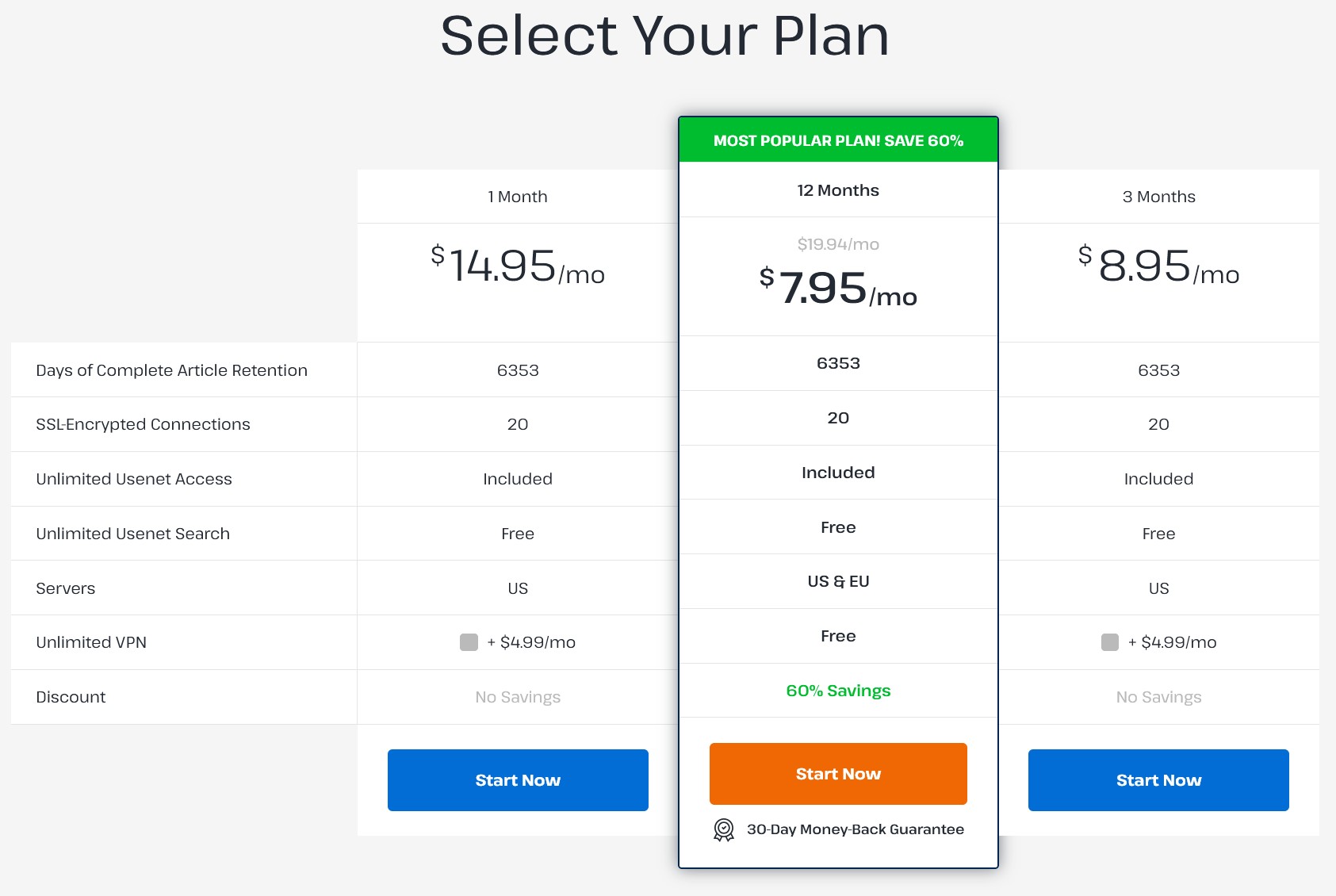
All plans come with free SSL encryption and unlimited Usenet search access via UsenetServer’s Global Search tool (more on that later). The key pricing strategy here is rewarding commitment: the annual plan’s effective rate is nearly half the monthly plan’s cost. At ~$7.95/mo, UsenetServer undercuts many competitors for an unlimited+VPN bundle – for example, Newshosting’s comparable yearly plan is around $8.33/mo and Easynews’s fully unlimited web plan tends to be higher (often $10+ unless discounted) due to its unique features. It’s worth noting that the monthly plan, while flexible, is relatively expensive at $14.95 (especially since it doesn’t include VPN by default).
If you’re just looking to dip a toe into Usenet, a quarterly term at $8.95/mo is a reasonable middle ground, but the best long-term value is clearly achieved with an annual subscription. The pricing is positioned as “premium service at a value price,” which rings true for the yearly deal. Overall, UsenetServer is competitively priced among top-tier providers – it’s not the absolute rock-bottom (budget providers with limited features charge less), but for what’s included, it’s a strong deal. The only caution is that if you truly don’t need the bundled VPN or the extreme retention, there are cheaper bare-bones options out there; otherwise, UsenetServer gives you a lot for the money.
Free Trial or Money Back Guarantees
Unlike some competitors, UsenetServer does not offer a free trial with usage limits – instead, they provide a 30-day money-back guarantee on all plans. This means you do need to sign up and pay for a plan to test the service, but you have up to 30 days to cancel for a full refund if unsatisfied. It’s essentially a risk-free trial period in practice. The refund policy is clearly stated: if you’re not 100% satisfied in the first month, you can cancel and get your money back, no questions asked. This generous guarantee shows confidence in their service and is particularly useful for new users who want to see if the speeds, completion, and features meet their expectations. By comparison, Newshostin, similar to UsenetServer, doesn’t have a free trial but does honor a 30-day money-back guarantee window. So, all three top providers ensure new customers aren’t stuck with a plan they don’t like.

Special Offers
UsenetServer frequently runs promotions, especially around holidays and via referral sites. At the time of writing, the standout offer is the Save 60%” yearly deal mentioned above – effectively locking in $7.95/mo for unlimited Usenet + VPN. This is advertised as a lifetime discount, meaning you keep that low rate for as long as you remain subscribed continuously. The provider’s website also highlights that this is the most popular choice, with around 81% of users opting for the annual plan (a testament to its value). Occasionally, UsenetServer has partnered with review sites for exclusive deals – for example, TopTenUsenet noted an offer of $7.95/month with 3 extra months free for new signups. It’s wise to search for UsenetServer coupon codes or promotions (such as Black Friday sales) because you might snag additional savings or bonus months. UsenetServer’s 60% off is on its fully unlimited offering and isn’t a short-term teaser rate; that’s a strong value offering. As for other bonuses, currently UsenetServer includes the VPN for free in the yearly plan, which in the past was a paid add-on – essentially a built-in special offer. There’s no separate “free month” trial beyond the refund guarantee, and no mention of loyalty programs or referrals on their site from what we’ve seen. In summary, the best way to subscribe to UsenetServer is via its annual discounted plan, and if you’re in the market, compare what Easynews/Newshosting are offering at the moment as well – you’ll often find all three competing to offer the most attractive bundle of Usenet + VPN at the lowest price.
Access Speed
When it comes to speed, UsenetServer delivers unlimited, uncapped throughput – you are only limited by your own internet connection and hardware. The service operates on a Tier-1 backbone with direct peering to hundreds of ISPs, which helps eliminate bottlenecks and keep latency low. In real-world terms, users consistently report being able to max out their broadband (whether that’s 100 Mbps or 1 Gbps) when downloading from UsenetServer. Because they maintain server farms in multiple locations (US and Europe), cross-continent speeds are also excellent, provided you can access the server nearest to you.

Here we must mention a notable quirk: on UsenetServer, European servers are only available to annual subscribers (the 12-month plan). If you’re on a monthly or quarterly plan, your connections are directed to U.S. servers only. For many users, this won’t matter – U.S. servers can still saturate a European user’s line in most cases – but it could mean a few extra milliseconds of latency or slightly slower speeds during peak times if you’re overseas. Competitors avoid this limitation: Newshosting, for instance, gives all users access to all server locations (no matter the plan), and Easynews includes multiple server clusters for NNTP by default. So, while UsenetServer’s network capacity and peering are top-notch, we recommend opting for the yearly plan if you’re outside North America to get the full benefit of a local EU server option.
Beyond that, there are no speed limits, no throttling, and no data caps on any UsenetServer account. Power users will appreciate that the service purchases bandwidth directly from Tier-1 transit providers rather than going through resellers, ensuring consistent maximum speeds even during peak traffic. In summary, UsenetServer is as fast as they come – on par with Newshosting, and essentially as fast as Easynews’s NNTP (Easynews web traffic can sometimes involve extra processing but also has an “EasyBoost” accelerator for web downloads). The only caveat is to match your plan to your location for optimal routing. Otherwise, whether you’re downloading headers or huge binaries, UsenetServer’s speeds are blisteringly fast and limited only by your ISP and equipment.
Server Connections / Configuration
UsenetServer supports up to 20 simultaneous connections per account by default. All plans have the same connection allowance (20 threads is plenty to saturate most connections; it’s fewer than some competitors offer, but in practice the difference beyond 20 is negligible for most users). For comparison, Easynews allows 60 connections on NNTP and Newshosting advertises up to 100 connections. While those numbers sound higher, it’s somewhat marketing-driven – very few users actually need that many threads unless they have an extremely fast line or are downloading many files concurrently.
The takeaway: 20 connections on UsenetServer is more than sufficient for maximum speed in almost all scenarios, and it also puts less strain on your newsreader and system. In terms of server addresses and ports, configuration is standard and straightforward. The primary hostname is news.usenetserver.com for IPv4 (and news6.usenetserver.com for IPv6). Depending on your location or preference, there are also specific regional hostnames (news-us.usenetserver.com / news-eu.usenetserver.com and their IPv6 equivalents) to manually target the US or EU server farm. You can use any of the offered hostnames; they all funnel into the UsenetServer cluster with the same retention. For ports: if you want an **encrypted connection (SSL/TLS)**, use port 563 (the default SSL port) or port 443 (an alternate SSL port often used to evade ISP throttling). Non-encrypted NNTP can use the classic port 119 or a variety of alternatives (20, 23, 25, 3128, 7000, 8000, 9000).
UsenetServer notes that unencrypted ports may offer slightly increased speed due to lower overhead, but given modern bandwidths, the difference is marginal and we strongly recommend sticking to SSL for privacy. Setup is simple: just plug the server name, your username/password, and one of those port numbers into your favorite newsreader. If you’re using an automated NZB downloader, the same info applies. UsenetServer’s support site provides step-by-step guides for popular clients like SABnzbd, NZBGet, and Newsbin if you need help with the configuration. Overall, UsenetServer’s server setup is flexible and robust**, supporting both IPv4/IPv6 and all the common ports. The only minor downside is the connection count being lower than some rivals, but 20 threads are already more than enough for even the fastest broadband in nearly all cases (and arguably, sending 100 simultaneous connections is overkill that can cause diminishing returns or ISP suspicion). Unless you have a very niche need for ultra high parallelism, UsenetServer’s config will serve you extremely well out of the box.
Provided Newsreader / Global Search
UsenetServer takes a somewhat minimalist approach when it comes to newsreader software. There is no proprietary UsenetServer-branded newsreader application included with the service – unlike Newshosting, which bundles its own custom client, or Easynews, which offers a full web-based interface. Instead, UsenetServer gives users a different perk: the Global Search tool. This is a web-based Usenet search interface that comes free with your subscription, allowing you to query over 100,000 newsgroups and create NZB files from search results. Essentially, Global Search functions as a built-in indexer for subscribers, saving you the trouble of finding an external NZB index. It’s a very handy feature – you log in on their website, enter keywords, and it will return matches (with filters for date, size, etc.), then let you download an NZB for the content you want. However, note that Global Search does not directly download or display content in the browser (as Easynews’s web interface does); you will still need a third-party client to actually fetch the articles using the NZB.
UsenetServer’s philosophy is to provide the raw access and search capability, and let users choose their preferred newsreader or downloader. In practice, this works well for experienced users who might already be using tools like SABnzbd, NZBGet, or Newsbin. In fact, UsenetServer integrates seamlessly with all standard newsreaders – you just plug in the server settings, and you’re off. They also supply detailed setup guides for many popular clients. The upside of not bundling a newsreader is that the service stays lightweight and avoids forcing any particular software on you. The downside is that novice users will have a slightly higher learning curve compared to, say, Newshosting’s one-stop application or Easynews’s zero-software approach.
If you’re completely new to Usenet, you’ll need to install and configure a newsreader yourself (or use their search plus a downloader). This is not too difficult – and the support knowledge base is there to help – but it’s something to be aware of. On the bright side, many consider third-party newsreaders more powerful or flexible than the basic clients providers include, so tech-savvy users won’t mind this at all. Additionally, by not tying you to a custom client, UsenetServer ensures you can easily switch between different apps or incorporate it into complex setups (for example, using automation tools like Sonarr/Radarr with SABnzbd, which is a very popular route among advanced users). In summary, UsenetServer is great if you already “bring your own newsreader,” and it compensates with an excellent web search feature for finding content. But if you were hoping for a glossy all-in-one app out of the box, you won’t find that here – you might look to Newshosting’s client or the unique Easynews web UI instead. It’s a trade-off between flexibility and convenience, and UsenetServer leans towards flexibility and giving power users the tools they need without babysitting the process.
Customer Support Review
UsenetServer provides 24/7 customer support, primarily via an online ticket/email system. In our experience and from user reports, their support team is knowledgeable about common Usenet issues (configuration, connectivity, account problems) and responds in a timely manner. You’re not likely to need support often – the service runs very reliably – but it’s reassuring that help is available around the clock. The provider’s website has a comprehensive Knowledge Base with FAQs, setup tutorials, and troubleshooting tips covering everything from newsreader configuration to using the VPN and security features. This self-help documentation is well-organized and can walk even a fairly new user through getting started. If you can’t find an answer there, submitting a support ticket will usually get you a response, often within a few hours (sometimes faster).
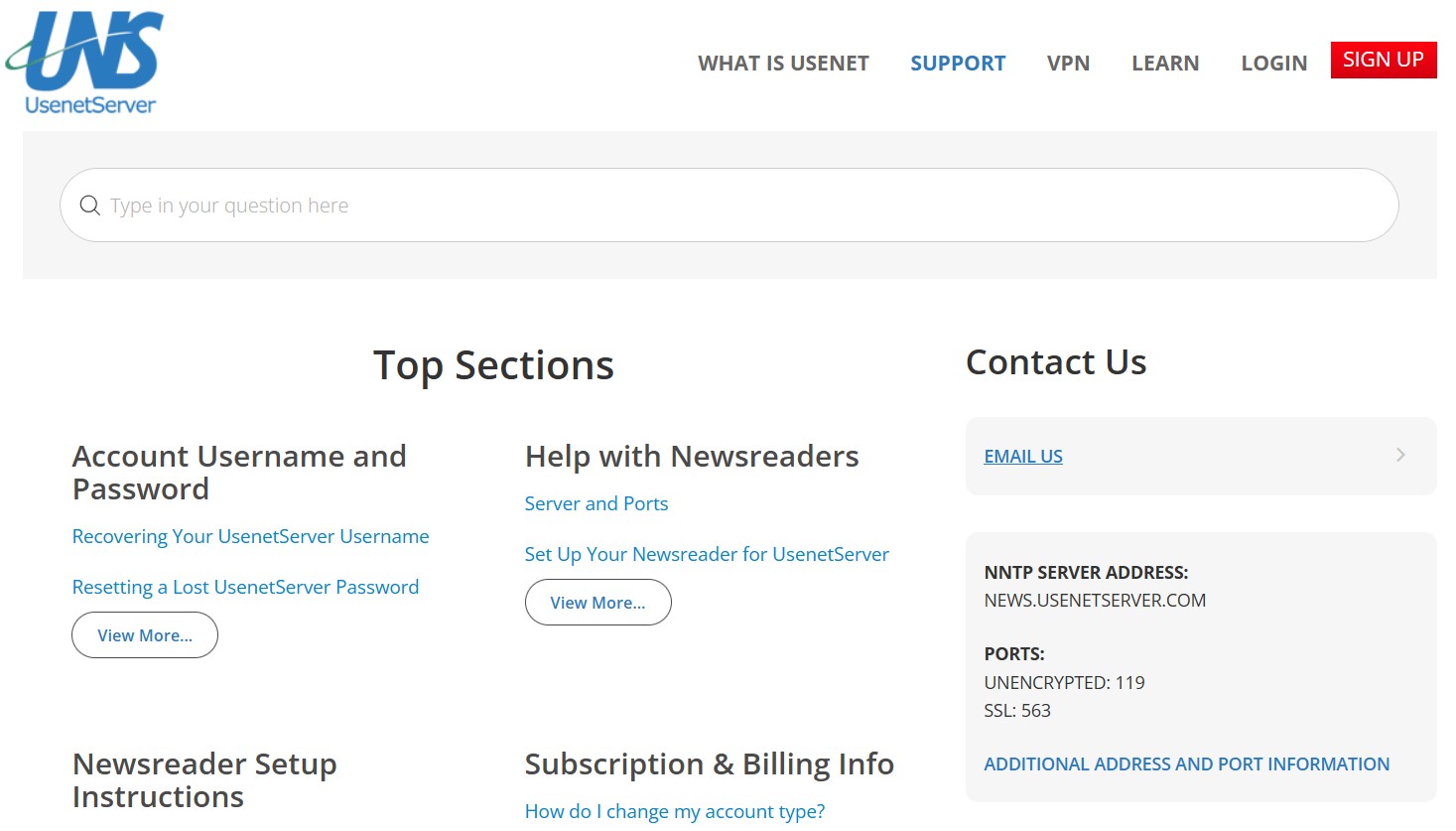
UsenetServer does not list a phone number or live chat support; this is typical in the Usenet industry – support is generally done via email/ticket across the board. Newshosting’s support is very similar (not surprising, given the companies are related and share a lot of backend operations). Easynews also offers 24/7 support via tickets and maintains a support center, although Easynews has the added complexity of supporting their web interface issues too. One thing we appreciate is that UsenetServer’s support team focuses on technical and account issues and doesn’t pry into what you download; they respect privacy and stick to helping you use the service.
Additionally, because UsenetServer has been around for so long, there’s a wealth of community knowledge on forums and Reddit for any odd issues that might crop up – chances are someone has seen it before. The tone of UsenetServer’s own messaging is very customer-centric, boasting that customer satisfaction is core to what they do. They also highlight that their staff is “friendly and knowledgeable,” which aligns with our interactions. As a slightly skeptical note, we’ll say that while 24/7 availability is claimed, very complex issues might not get resolved at 3 AM instantly – you might get an initial response and then more substantive follow-up during business hours. But for most queries (password resets, connection errors, etc.), the round-the-clock support ensures you’re not left stuck no matter when you’re using the service. Overall, UsenetServer’s support is reliable and well-regarded, falling in line with what premium providers like Newshosting offer. We did not encounter any major problems in our test inquiries. If customer support quality is a deciding factor for you, it’s safe to say UsenetServer meets the bar, though it doesn’t particularly exceed it in terms of channels offered. It’s solid, professional support – exactly what most users will need.
Payment Options
Signing up for UsenetServer, you can pay with all major standard methods. They accept all major credit cards (Visa, MasterCard, Discover, American Express, JCB, etc.) as well as PayPal for those who prefer using a PayPal balance or linking to a bank account. This covers the majority of users, but notably, UsenetServer does not list any cryptocurrency or anonymous payment options. So if you were hoping to pay with Bitcoin or other crypto for privacy, that’s not currently supported – your best bet in that case would be to use an intermediary (like a prepaid card or Privacy.com virtual card via PayPal) or consider a provider that explicitly takes crypto. Neither Easynews nor Newshosting is particularly ahead in this regard; Newshosting also sticks to card/PayPal and has no crypto payments. A few European providers (e.g., Eweka or some resellers) do accept crypto or bank transfers, but with UsenetServer being a US-based service, the payment methods are what you’d expect for an online subscription.

All payments are handled through a secure portal, and if you choose PayPal you can use either a one-time payment or set up a subscription that auto-renews. Be aware that UsenetServer subscriptions will auto-renew by default at the regular price of your plan, so the annual plan will renew annually, monthly renews monthly, and so on. If you ever want to cancel, make sure to do so before the next billing cycle (or within the 30-day refund period for new sign-ups). We didn’t find any evidence of them accepting checks, cash, or other forms of payment – it’s all electronic online payments, which is standard for the industry now. On a positive note, having PayPal as an option is great for those who don’t want to directly share credit card details, and it also makes managing the subscription easier (you can cancel from your PayPal dashboard if needed). In summary, UsenetServer covers the common payment bases but doesn’t cater to the niche of anonymous payments. If paying anonymously is important to you, you may need to consider an alternate provider or workarounds. Otherwise, the checkout process is simple and secure, and the inclusion of PayPal is a welcome convenience for many users.
Final Thoughts
UsenetServer has earned its reputation as a top-tier Usenet provider by delivering on the core needs of Usenet enthusiasts: speed, retention, and reliability. In 2026, it stands shoulder to shoulder with services like Newshosting and Easynews, matching them in retention and offering a comparable suite of features (and even outdoing some in price). Its strengths are clear: an enormous archive of posts for comprehensive searches, very high completion rates, no speed limits, and a robust backbone that ensures downloads are fast and consistent. Moreover, the inclusion of a VPN and security tools adds value for users who are privacy-conscious – it’s a nice bonus to get an unlimited VPN thrown in, effectively covering your tracks both in and out of Usenet. The service is also reasonably priced, especially on the annual plan, making it a great long-term value.
That said, our review wouldn’t be complete without a dose of skepticism on a few points. First, UsenetServer is not for everyone. If you’re a total beginner looking for an all-in-one, hand-holding solution, you might find UsenetServer a bit spartan. There’s no fancy custom app; you’ll be expected to know (or learn) how to use a newsreader and NZBs. In contrast, Easynews might be a better fit for those users – its web interface requires no additional software and is extremely newbie-friendly. Likewise, Newshosting provides a built-in application that simplifies a lot of things for novices. UsenetServer’s Global Search is powerful, but it’s a tool for those who are comfortable managing downloads themselves. In short, UsenetServer is not for someone who wants a “point-and-click” Usenet-in-your-browser experience; it’s geared more toward users who don’t mind (or prefer) using their own software and methods.
Another criticism: the segmentation of features by plan (like EU servers only on annual) is an odd quirk that competitors avoid. It’s not a deal-breaker in our opinion – since the majority will opt for the annual anyway – but it’s worth noting that others don’t impose that restriction. Additionally, while the security bundle is great, some users might see it as extraneous bloat if they already have a VPN or ad-block solutions. Competitors like Newshosting also bundle a VPN, so this is more of an industry trend than a flaw, but if you were just looking for pure Usenet access without any extras, you might feel you’re paying (even if indirectly) for features you won’t use. The flip side is that compared to Easynews and Newshosting, UsenetServer’s package is arguably just as comprehensive – it just delivers it in a different way (less integration, more mix-and-match).
As with any service, there are trade-offs. UsenetServer’s trade-off is essentially between raw Usenet performance vs. user-friendliness. It chooses to maximize the former. You get an extremely fast, reliable feed and a gigantic library of articles, but you won’t get the slick UI or newbie-oriented features that something like Easynews provides. For seasoned Usenet veterans or those willing to become one, this is a fantastic deal – you’re not paying extra for bells and whistles you don’t need. For those who want convenience above all, you may prefer the competition even if it means a smaller archive or higher cost.
In Conclusion
In conclusion, UsenetServer remains one of the best choices for serious Usenet users. It combines nearly everything one could ask for in a premium provider: very long retention, high completion, unlimited speed, solid security options, and fair pricing. The service has kept evolving (the retention keeps growing daily, and features like Global Search 2.0 show they continue to innovate). While it’s not the most beginner-friendly option out-of-the-box, it’s by no means difficult to use with a little guidance – and the payoff is worth it.
If you value performance and depth of content and don’t mind setting up your own newsreader, UsenetServer is a top-tier solution that likely won’t disappoint. For users who absolutely need a more guided or integrated experience, consider Easynews’s web interface or Newshosting’s app – but know that you might be trading away some flexibility or paying a bit more. Ultimately, UsenetServer delivers exactly what its name suggests: a powerful Usenet server service, with all the privacy and security trimmings, at a very reasonable price. It’s a premium service at a value price for those who appreciate what it brings to the table.