
Table of Contents
Newshosting is a veteran Usenet provider that I’ve seen evolve over many years. It’s known for an all-in-one service approach: massive retention, fast speeds, built-in security features, and even its own newsreader software. In plain terms, Newshosting aims to be a one-stop shop for Usenet access. Having tried numerous providers (including close competitors like UsenetServer and Easynews), I find Newshosting to offer one of the most comprehensive packages available. It combines the depth and power an advanced user expects with enough ease-of-use for a newcomer to get started quickly.
The service emphasizes security and privacy (SSL encryption on every connection, and a VPN included), plus it layers on conveniences like an integrated search engine and ad-blocking. The tone of Newshosting’s offering is “premium” – it wants to be the top-tier provider across the board. Of course, big claims invite scrutiny. As a slightly skeptical long-time user, I’ll delve into each aspect below and compare it to what UsenetServer and Easynews bring to the table. In short, Newshosting largely delivers on its promises, but there are some trade-offs and nuances that an experienced user will notice.
Retention & Completion
Newshosting currently offers industry-leading retention – on the order of over 6,424+ days. In practical terms, you can dig up content from the mid-2000s and beyond. They spool new days of retention daily, so the archive keeps growing. This is one of Newshosting’s flagship features and it’s not just a number on paper: in my use, I’ve genuinely found obscure 10+ year-old posts still there for downloading.
For comparison, UsenetServer’s retention is effectively identical – they share the same backbone, so you’re looking at the same ~17 years of articles. Easynews also advertises similar retention for its web-based index (over 6,424+ days as of recently). In other words, among the top providers, Newshosting isn’t alone in having multi-year depth, but it’s at the very top of the range. The practical difference is minor if all have ~17 years, but it means Newshosting keeps pace or edges out any competitor on retention. If you’re coming from a smaller provider with say 3,000 days, the difference in what you can find is huge.

Article completion is excellent. Newshosting touts 99%+ completion rates and this holds up in reality. I rarely encounter missing segments on popular binary posts; virtually everything that should be on the servers is there and intact. (They claim 99.99% completion, which I can’t “measure” myself, but anecdotally it’s been rock solid.) When directly comparing, I saw no completion advantage with UsenetServer over Newshosting – as expected, since they pull from the same server farms. Easynews via its web interface also yields very complete results, though occasionally a post might show as unavailable if it was removed on the backend.
Real-world note: Retention isn’t everything. While Newshosting stores an enormous archive, very old content can still be inaccessible if it was subject to takedown requests. Newshosting is US-based and complies with DMCA removals. This means that if something was removed, it doesn’t matter that they keep 17 years of data – that particular item won’t be available. This is not a knock on Newshosting per se (every US provider including UsenetServer faces this), but it’s a reality to consider.
Pricing
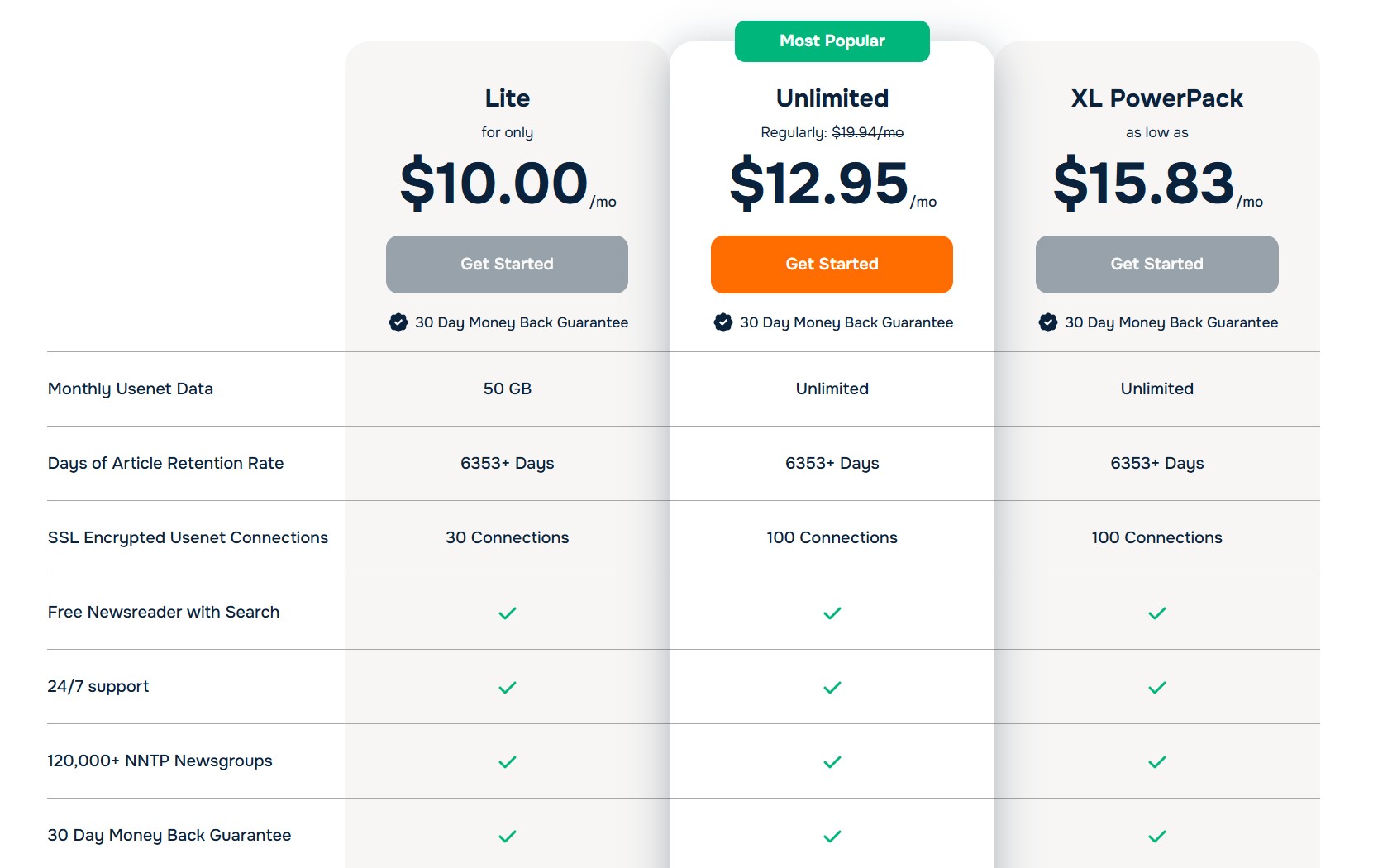
Newshosting offers three main subscription tiers. The pricing is straightforward, though it can vary depending on promotions. Here are the current plans and their key details:
- Lite – $10.00/mo: Capped at 50 GB of Usenet data per month. Allows up to 30 simultaneous connections. Includes all core features (SSL encryption, the free newsreader app, 24/7 support, etc.) but the data limit makes it best suited for light users.
- Unlimited – $12.95/mo (on sale, regularly $19.95): Unlimited Usenet data (no download caps) with up to 100 connections. This is the most popular plan for heavy users. It currently has a big discount, bringing it to $12.95 monthly – a great deal, frankly. The plan includes everything: full speed access, the free VPN service, and even Easynews web search (according to the latest info on their site).
- XL Powerpack – $15.83/mo (billed $189.95 annually): Unlimited Usenet data with 100 connections, bundled with a few extras. This annual plan effectively averages $15.83 per month. The XL Powerpack includes the Easynews web-based Usenet access as a bonus and the VPN is included as “unlimited VPN”. It’s essentially Newshosting’s “premium package” for those willing to pay upfront for a year.
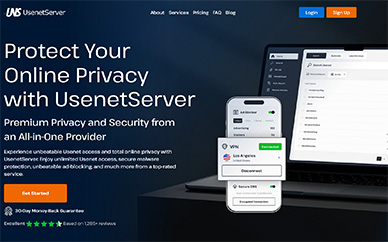
All plans come with the same core feature set (high retention, SSL, the newsreader software, etc.). The differences are in data limits and included add-ons. One thing to note is that the Unlimited monthly plan’s current $12.95 price is a promotional rate – significantly lower than its regular price or the XL’s effective rate. It’s somewhat unusual: usually an annual plan gives a better monthly equivalent price, but here the monthly is so discounted that it’s cheaper month-to-month (at least for now). This might be a limited-time offer or one you get via certain sign-up links. In any case, it’s an excellent value if you lock it in. By contrast, UsenetServer’s standard unlimited plan is around $7.95/mo if you pay annually (they often run $95/year deals), which undercuts Newshosting’s regular pricing. However, UsenetServer at that price may not include extras like a newsreader or global search unless you add them. With Newshosting you’re paying a bit more for an all-inclusive experience.
Easynews pricing is a different animal – they traditionally charge based on tiers of web usage (e.g. a certain GB per month for web downloads) and their “Unlimited NNTP” plan (if using a newsreader) costs upwards of $20+ a month normally. If you value Easynews’s web interface, getting it bundled via Newshosting’s XL plan can actually save you money versus subscribing to Easynews separately. It’s like getting two services in one. On the other hand, if you have zero interest in a web interface and just want raw NNTP access cheap, UsenetServer’s long-term discounts or some smaller providers could be budget-friendly alternatives.
Overall, Newshosting positions itself as premium but affordable, especially with the current discounts. It’s not the absolute rock-bottom price option (some competitors do offer slightly lower prices for unlimited access if you shop around or commit to multi-year deals). But considering Newshosting’s quality and included features, I consider the pricing fair. Just keep an eye on renewal rates – if you sign up during a sale, verify whether that price is “for life” or only the first term. They have in the past renewed accounts at regular price once the promo period ends. As a savvy user, I set a reminder to renegotiate or cancel/re-sign if needed when my term is up. Newshosting’s support has been responsive in honoring promotional rates when I’ve reached out, but it’s on us as customers to stay on top of it.
Free Trial / Money Back Guarantees
Newshosting no longer offers a traditional free trial. Instead, all plans come with a 30-day money-back guarantee. This means you must sign up and pay upfront, but if you’re not satisfied for any reason, you can request a full refund within the first 30 days of your subscription. Newshosting explicitly describes this as a “no questions asked” guarantee. While I haven’t personally needed to request a refund, it’s reassuring to know that safety net is there—it demonstrates confidence in the service. Just be sure to contact support within the 30-day window if you decide to claim the guarantee.
For comparison, UsenetServer and Easynews also do not offer true free trials. Like Newshosting, both rely on a money-back guarantee model, requiring users to sign up with payment information first and request a refund within a defined satisfaction window if the service isn’t a good fit. This approach has become the norm among premium Usenet providers, as it limits abuse while still giving users enough time to properly evaluate performance.
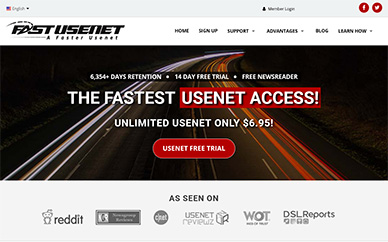
By contrast, services like Fast Usenet still offer a limited free trial, typically providing 14 days with 15 GB of data. This allows users to test the service without paying upfront, which may appeal to especially cautious or very light users. The trade-off is that trial usage is capped and does not fully reflect long-term, unlimited performance. One thing to keep in mind is that Newshosting subscriptions begin immediately and will auto-renew unless canceled. This is standard practice across the Usenet industry. If you’re unsure about continuing, it’s smart to set a reminder a few weeks in so you can make a decision before the 30-day refund window closes. Based on user feedback, Newshosting’s support team is straightforward to work with on refund requests, reinforcing the impression that they prioritize long-term customer satisfaction over short-term signups.
Special Offers
Newshosting isn’t shy about running promotions. Over the years I’ve seen a number of special deals and bundles that can add value or cut the cost significantly:
- Seasonal Sales: Big events like Black Friday/Cyber Monday often come with steep discounts. For example, last Black Friday Newshosting advertised a huge discount on an annual plan (something like 70% off the regular price). These sales can bring the effective monthly cost way down (sometimes under $8/month for unlimited access plus VPN).
- “Lifetime” Discount Links: Occasionally Newshosting offers discount pricing that they claim will be locked in for the life of the account. One year I saw a deal around $99/year for Unlimited (roughly $8.25/mo) via an affiliate link. These lifetime discounts are gold if you snag one – just be sure to keep the account active. UsenetServer similarly has had “locked-in” deals via third parties. It pays to scout around on forums or provider comparison sites for these links, as the official site might not always show the lowest possible price.
- Bundle Deals: Newshosting has done unique bundle promotions, such as including a free subscription to a partner service. A noteworthy one was when they bundled **Tweaknews (EU Usenet provider)** accounts for free with a Newshosting subscription. This was an awesome offer because it gave you a completely separate backbone to complement Newshosting (addressing the DMCA issue noted earlier). Essentially one subscription got you two providers. This isn’t a standard package normally, but it shows that Newshosting gets creative with offers. Keep an eye out for announcements around major holidays for things like this.
- VPN Upgrades: While the Unlimited and XL plans include the VPN already, I’ve seen promotions where they emphasize the VPN “free for a year” or upgrade Lite users to include VPN at a discount. Since the VPN is now part of most plans by default, this is less of a separate offer and more a built-in value. But in the past, Newshosting charged extra for VPN on lower tiers, so watch for wording changes – right now it looks like even the $10 Lite comes with VPN included (which is great if true).
One thing to clarify: regional pricing and taxes. Newshosting’s base prices are in USD. If you’re signing up from Europe or elsewhere, you might see prices in your local currency. Typically, €1 = $1 in their system (so €10 for Lite, etc.), plus applicable VAT. For example, £7.75 was roughly equivalent to $10 for the Lite plan in the UK, which matches that pattern after VAT. So the “sticker price” might look different, but it’s basically taxes. The service itself is the same. I haven’t noticed region-specific differences in features – a European user gets the same retention and speeds (actually possibly better latency to the EU server cluster) – it’s purely a billing presentation difference.
Newshosting also maintains a blog and a deals page sometimes. It’s worth checking their official blog or even their Twitter for flash deals. I recall a Reddit thread about a “never again deal” where Newshosting offered an extremely low rate (something crazy like $1.67/mo for a short period). While promos like that are rare, they do create buzz. As a rule, if you’re considering signing up and a big sale day (Black Friday, New Year, etc.) is near, it might be worth waiting to see if a better offer pops up. Conversely, if you find a good deal now, jump on it – there’s no guarantee it’ll be around later.
Overall, the special offers environment for Newshosting is very active. This is a slight contrast to Easynews, which tends to keep a more fixed pricing model (they do sales too, but not as frequently broad). UsenetServer is similarly aggressive with discounts (being a sister company, they often mirror deals). The competition between these sibling services often means if one has a sale, the other might too. From an experienced user perspective, this is great – it means we have leverage to get good pricing if we shop around.
Access Speed
Speed is a critical factor for any Usenet provider, and Newshosting excels here. They advertise uncapped speeds, meaning they do not throttle your downloads at all. In practice, the speed you get is limited only by your internet connection and how many threads (connections) you open. On my gigabit fiber line, Newshosting easily maxes it out. Downloading at 100+ MB/s (megabytes per second) is straightforward with 20 or so connections. If I push it to the full 100 connections (which honestly isn’t necessary), I can sometimes squeeze a little extra out during peak hours, but generally even a dozen connections yield full bandwidth.

Server infrastructure: Newshosting operates multiple server farms across North America and Europe. They automatically direct you to the best server node via the generic news.newshosting.com address. I’ve noticed that pings from the US East Coast hit their US servers, whereas a friend in Germany gets routed to their EU cluster – all transparent to the user. This distributed network means lower latency and consistent throughput regardless of your location. In comparison, some smaller providers might have a single data center; if you’re far away, you could see slower speeds or higher latency. I’ve never had that issue with Newshosting.
UsenetServer vs Newshosting (Speed): In my experience, there is zero discernible difference. This makes sense as they likely share the same backbone. If I switch my config from Newshosting to my UsenetServer account, I get the same download rates on the same files. Both saturate my line. So performance-wise these two are tied. Where Newshosting might edge ahead is the higher connection count (100 vs UsenetServer’s default 20 connections), which could potentially help in scenarios where single-thread speeds are limited. But to be fair, even 20 connections are enough for almost everyone. It’s more a bragging right than a real advantage for daily use.
Easynews (Speed): Easynews provides two modes of access: web and NNTP. If you’re using their web interface to search and directly download or stream, speed can sometimes feel a tad slower only because you might download one file at a time through the browser, and their web server might limit throughput per connection. It’s generally very fast for a web service (I’ve streamed HD video from Easynews with no buffering), but power users who want to pull dozens of GBs in parallel will always prefer using an NNTP client. Easynews does allow NNTP access as well (depending on your plan) and when used that way, it’s as fast as Newshosting – again, likely hitting the same backbone servers. So no complaints there.
To summarize, Newshosting provides top-tier speed. Whether you’re grabbing a small text post or downloading massive multi-gigabyte binaries, the service delivers as fast as you can take it. In this regard, it stands shoulder to shoulder with UsenetServer and any other Tier-1 provider. The days of one provider being “faster” than another are mostly gone when you’re comparing these big players – they all have excellent infrastructure. Newshosting definitely checks that box. If coming from a weaker provider or one of the inexpensive resellers, you’ll likely notice a jump in consistency and peak throughput after switching to Newshosting.
Server Connections / Configuration
Newshosting gives you a lot of flexibility in how you connect to their servers. Here are the key technical details:
- Connections: The Unlimited and XL accounts support up to 100 simultaneous connections. The Lite account supports up to 30 connections. In practical terms, even 30 is more than enough for most users, and 100 is overkill for one person’s usage. The high connection count can be useful if you have multiple devices or applications pulling at once, or if you just want to ensure maximum speed even if each thread is a bit slower. UsenetServer by contrast offers around 20 connections by default (though they might allow more on request or on certain plans). I consider anything above 20 to be gravy. The vast majority of my usage I cap at 20 threads and saturate my gigabit line. But having that cushion up to 100 is nice – it’s a “no limits” vibe that Newshosting likes to project.
- Server Addresses: The primary news server is
news.newshosting.com. This address will auto-direct you to the nearest/fastest server farm (using DNS magic to choose the US or EU cluster). If needed, you can also explicitly usenews-us.newshosting.comfor the United States servers ornews-eu.newshosting.comfor European servers. They even list anews-nl.newshosting.comspecifically for Netherlands, which likely maps to the EU servers (or a subset in NL). For IPv6 users, parallel hostnames exist:news6.newshosting.com,news-us6, etc. Most users won’t need to worry about these specifics – the default server name and your client’s “automatic server selection” usually handle everything. But it’s good to know, for example, if one cluster ever has an issue, you could manually switch to the other. - Ports: Newshosting supports a wide range of ports for connectivity:
- SSL Encrypted: 563 (default SSL port) and 443. Port 443 is useful because it’s the standard HTTPS port – if your network blocks typical usenet ports, 443 can often get through undetected as it looks like regular secure web traffic.
- Unencrypted: 119 (default NNTP), and alternatives like 23, 25, 80, 3128. These are provided in case your ISP blocks 119, etc. Honestly, always use SSL if possible (there’s no good reason not to encrypt these days), but the presence of port 80 or 25 means you could route through restrictive networks if needed (though again, better to use SSL on 443 in those cases).
- Configuration Ease: If you use the Newshosting client software, configuration is basically zero – it comes pre-set with the server info. If you use a third-party app like SABnzbd or NZBGet, you just input the server address, your username/password, and choose the port. I’ve configured Newshosting in many apps and it’s straightforward. They don’t use any oddball settings. The service supports NZB downloads, header downloads, and article posting (if you participate in text groups). It’s full NNTP access, no restrictions in that regard.
- Connections in Use: A quick tip from experience – you’ll generally find diminishing returns after ~20 connections. If you set up 100 connections in your client, you might actually strain the server or your own device more than necessary. I usually configure 20–30 connections and that saturates my 1 Gbps line. With fiber going beyond 1 Gbps becoming more common, maybe some users will truly benefit from 50+ connections to hit 2 Gbps, etc. But either way, Newshosting gives the headroom to experiment. By contrast, Easynews web interface is single-connection per download (but you can download multiple files at once in separate browser tabs). Easynews NNTP (if used) I believe supports up to 60 connections on their “Big Gig” plan and possibly more on their unlimited – but I’d have to check their docs. In practical terms, all these top providers allow enough connections to max out consumer internet speeds.
Stability-wise, Newshosting’s servers are very reliable. It’s rare to encounter downtime. I can count on one hand the number of times I noticed the service unreachable in the past year, and even then it was typically a brief maintenance window or a network hiccup. They have redundant server clusters so issues are isolated. One user testimonial on their site mentions a server outage that was resolved in an hour – that sounds about right in my experience. UsenetServer users report similar reliability (again not surprising). It seems the same team monitors both. Easynews had a major outage once a couple years back (web side issue), but generally also stays up. In terms of configuration differences: Newshosting and UsenetServer both require an external client (unless you count Newshosting’s own app). Easynews can be used purely through a browser with no config at all, which is its unique selling point. However, thanks to Newshosting’s inclusion of Easynews with XL accounts now, even Newshosting users have that no-setup option if they want it.
Provided Newsreader
One of Newshosting’s big advantages, especially for those who want an integrated experience, is their free, provided newsreader application. This is a custom piece of software you get with your subscription (downloadable from their site) that’s pre-configured for Newshosting. After using various third-party clients over the years (from the old Forte Agent days to modern NZBGet/SABnzbd combos), I was pleasantly surprised by Newshosting’s own app. It’s clearly designed to cater to both casual users and intermediate ones who want some bells and whistles without a complicated setup.
- Built-in Search: The app has an integrated Usenet search engine. This lets you query across all newsgroups for keywords (essentially performing the role of an indexer or NZB site). The search is unlimited and included free with your account. For someone without an external indexer, this is incredibly handy. You can find posts by subject, author, etc., and then immediately download or preview them.
- Zero Configuration: Because it’s their in-house client, your account info and server settings can auto-populate. You basically log in once and you’re set. No need to manually enter server names or tweak port settings if you don’t want to – the app already knows the optimal setup (SSL on, correct port, etc.). It makes onboarding very easy for newcomers.
- NZB Handling and Automation: The newsreader can load NZB files (so if you still use external indexing sites, you can feed the NZBs into it). It also has an auto-search/auto-download feature: you can set up watch lists for specific keywords and it will automatically grab new matches. This is akin to a rudimentary Sonarr/Radarr setup but built into the client.
- Article Preview and Media Viewing: The client allows you to preview text of articles and even sample media files (like thumbnails for images, etc.) before downloading the whole thing. It’s not as slick as Easynews’s in-browser preview (where you can literally stream a video or view images on the web), but it does help you verify you found what you want. For text discussions, the reader interface is straightforward and you can participate in newsgroup conversations if that’s your thing.
- Multi-Platform Support: Importantly, the Newshosting newsreader is available for Windows, Mac, and Linux. As a Linux user myself, I appreciate that they didn’t leave us out (the Linux version is a native app and runs well). This cross-platform support is something many third-party newsreaders lack (or they require using WINE or command-line). So kudos to Newshosting for that.
Using the Newshosting client versus a popular third-party alternative: If you’re a power user who already has an elaborate setup (like SABnzbd integrated with Sonarr, etc.), you might not switch to Newshosting’s app as your primary. Those external tools offer advanced post-processing, integration with media libraries, etc., that a simple newsreader won’t fully replicate. However, I know many long-time users (myself included) who still like a traditional GUI newsreader for certain tasks or quick searches. Newshosting’s app fills that niche nicely. It’s updated regularly enough and I haven’t run into major bugs. It’s not the flashiest UI, but it’s functional and gets the job done without fuss.

Comparison to Competitors
This is an area where Newshosting stands out, because UsenetServer does not offer a proprietary newsreader. UsenetServer customers typically must use third-party software (which is fine, but there’s an extra step and possibly extra cost if you go with a paid client like NewsBin or NewsLeecher). Some UsenetServer deals have bundled a “global search” via their web portal, but they don’t have a dedicated downloadable client with search. So Newshosting gives a more integrated experience out of the box. Easynews, on the other hand, takes a completely different approach: their “client” is your web browser. Easynews has the best web-based interface in the business – you log into their site and you can search and download from there. It’s superb for ease of use, but it’s also quite distinct from the traditional Usenet workflow. Newshosting’s approach sort of meets in the middle: you get a user-friendly interface, but it’s still a desktop application following the NNTP paradigm. Now that Newshosting includes Easynews access (at least with XL Powerpack, possibly with Unlimited as well), you kind of get the best of both. I’ve found myself using the web interface (Easynews) when I’m on a device where I can’t install the client (say, at work or on a mobile browser) and using the Newshosting client on my home PC for bulk downloads and automated pulls. This combo is a unique perk of Newshosting’s ecosystem.
Support Review
Newshosting claims to offer 24/7 support, and based on my experience, that’s not just a marketing claim. The support model is primarily through a ticket/email system (via their support center website or email address). There’s no phone support or live chat that I’m aware of, but the ticket responses have been prompt and helpful. When I’ve opened a ticket – be it a billing question or a technical issue – I usually got a reply within a few hours, sometimes even faster. They state “available 24/7” and while I haven’t needed them at 3 AM, the turnaround has been quick even on weekends. The quality of support is solid. The staff seems knowledgeable about Usenet specifics. You’re not getting clueless scripted responses; if you ask something like “I’m having trouble with header compression in my client” you’ll get a meaningful answer, not a generic “reinstall your software” reply.
I should note that UsenetServer’s support is essentially the same team (the two services are under the same umbrella company). So if you’ve dealt with UsenetServer support, expect similar treatment with Newshosting. That’s a good thing in my book – I’ve found UsenetServer support equally responsive. Easynews, being a slightly different product, has its own support channel, but I suspect they’re closely related as well. Easynews support tends to focus on helping with web usage issues or explaining how to use their search syntax, etc. Newshosting support, on the other hand, often handles more traditional issues like connection troubleshooting or account upgrades. Either way, all three have mature support operations compared to small-budget providers where support might be one person checking emails once a day.
I want to share a critical perspective: no company’s support is perfect. I have seen a few user reports (for instance on Reddit or forums) where someone had a billing surprise or cancellation issue that support initially didn’t handle to the user’s satisfaction. For example, one long-term user of UsenetServer mentioned being auto-renewed at a higher price unexpectedly. These things can happen if you’re not watching your account. However, when they escalated with support, the issue was eventually corrected. In my own case, I had a credit card expire and my renewal failed; Newshosting support gracefully reinstated my account under the old promo price once I updated the payment info, even though I was technically past due. That was a big relief and earned my loyalty.
The knowledge base and self-help resources are also worth mentioning. Newshosting has a pretty extensive online help center with FAQs, setup guides, and troubleshooting tips (covering everything from configuring common newsreaders to optimizing speed or using their VPN). Many times you can find an answer without even needing to contact support. I used their knowledge base to get the exact server addresses and port list, for example. They also have tutorial guides for using the included VPN on various devices, which was handy when I first tried it on my phone.
In summary, my take on Newshosting’s support: professional and reliable. They might not have the hand-holding live chat some services offer, but they make up for it in expertise and availability. As an experienced user I don’t need support often, but when I do (or when newbies ask me for help), it’s good to know Newshosting’s team is responsive. All in all, I put their support on par with the best in the Usenet industry. If I had to nitpick, I’d say maybe adding a live chat for quick questions would be nice, but it’s hardly necessary given how well they handle tickets. Compared to cheaper providers where emails vanish into a void or responses take days, Newshosting clearly reinvests in customer service, which is likely why they have a loyal user base going back decades.
Payment Options
Newshosting accepts pretty much all the standard payment methods you’d expect for an online subscription service (but with a few notable omissions for the ultra-privacy-conscious folks):
- Credit/Debit Cards: Visa, MasterCard, American Express, Discover, and even less common ones like JCB. If you have a major card, you can use it. I’ve used both a Visa and an Amex with them at different times without issues. Charges appear as a generic transaction on statements (nothing that screams “Usenet” for those worried about discretion).
- PayPal: Newshosting does support PayPal, which is great if you prefer not to directly give out your card info or if you want the flexibility of PayPal’s funding sources. I currently pay via PayPal and the recurring subscription just auto-bills from there. It’s worked seamlessly, and it’s easy to cancel via PayPal dashboard if needed. I know some users who specifically choose providers that take PayPal for an added layer of buyer protection and ease of cancellation.
- No Cryptocurrency or Cash: Unlike a few smaller or niche providers, Newshosting does not accept Bitcoin or other cryptocurrencies, and obviously no cash/check or other exotic methods. For some, this is a slight downside – if you wanted to sign up truly anonymously, you can’t simply pay in crypto. Providers like Eweka or some resellers do allow Bitcoin, but Newshosting (and its sister companies like UsenetServer/Easynews) stick to traditional payments. From a business perspective, I get it – it simplifies things. But privacy purists might frown here. Personally, I’m okay using PayPal, but I acknowledge that requiring a traceable payment means Newshosting will have your billing info on record.
- Subscription Model: Payments are subscription-based, meaning they will auto-renew at the interval you signed up for (monthly or yearly). If you’re on monthly, you get charged each month automatically until you cancel. If on annual, once per year. This is standard, but be aware that if you want to stop, you must actively cancel. They do send reminder emails for annual renewals (at least I got an email a few weeks before my year was up, which is considerate). As noted earlier, ensure any promo pricing is clarified at renewal – if you used a coupon, double-check if that stays in effect.
The payment experience overall has been smooth for me. Sign-up was straightforward, and their account control panel lets you update your card or switch payment method easily. One time my PayPal billing agreement glitched (probably on PayPal’s side) and my payment didn’t go through – Newshosting emailed me about it and gave me a grace period to fix it. So they don’t immediately terminate your account the second a payment is missed; there’s a window to sort things out, which is nice.
Final Thoughts
As someone who’s been around the block with Usenet, I approach any provider’s claims with a healthy dose of skepticism. Newshosting, however, has earned a lot of my trust over time. It’s a powerhouse service with very few weaknesses. The retention is second to none, speeds are unfailing, and they bundle so many extras (newsreader, search, VPN, web access via Easynews) that it genuinely adds up to a complete package. In a direct head-to-head: Newshosting vs UsenetServer vs Easynews – I’d say Newshosting comes out on top if you value an integrated experience and all-around capabilities. UsenetServer might tie on raw Usenet performance (since it’s essentially the same backbone) and sometimes edges ahead on price, but it lacks the bells and whistles (no dedicated app, a less prominent search feature). Easynews is fantastic for what it is (browser-based Usenet made simple), but for heavy downloading I always pair it with a traditional provider anyway. With Newshosting, especially the XL Powerpack, I effectively get Easynews included, which makes it a no-brainer choice for me.
Critiques?
Sure, a few minor ones: The included VPN, while nice, isn’t as full-featured as say a standalone top-tier VPN service. It covers the basics (zero-log policy, multiple server countries, apps for major platforms), and it’s great that it’s thrown in “free.” Just manage expectations – if you need advanced VPN features or a huge selection of server locations, you might still keep a separate VPN subscription. I consider Newshosting’s VPN fine for casual privacy (e.g., preventing your ISP from seeing your activity, or securing coffee shop Wi-Fi). But it won’t beat something like ExpressVPN or ProtonVPN for global coverage. That said, UsenetServer’s “free VPN” is literally the same one (they both bundle the VPN by Privado service, from what I can tell). Easynews also started including a VPN in some plans. So it’s become almost a standard add-on rather than a standout differentiator.
On the positive side, Newshosting’s longevity (they’ve been around since the late 1990s) gives me confidence. They’ve invested in keeping up their infrastructure, evidenced by retention constantly increasing and network upgrades over the years. They’re not riding on old glory – you can tell the service in 2026 is faster and more feature-rich than it was a decade ago. Not all providers can say that; some have stagnated or cut back. Newshosting has maintained a top-tier offering consistently.
Final verdict, If someone asked me “Which Usenet provider should I choose right now?” I’d highly recommend Newshosting, especially to any user who wants a blend of power and convenience. It’s kind of the Swiss Army knife of Usenet: you get everything in one account. It’s great for newbies (because of the easy client and web access) and satisfying for veterans (because of the depth of retention and reliability). The price is justified by the quality and extras, and with the frequent deals, it often becomes a steal. I appreciate that they’ve tried to innovate (like adding threat protection, ad-blocking, partnering with Easynews, etc.) instead of just offering a dumb pipe. That shows they’re looking to differentiate and improve the user experience.
Of course, no single service is perfect for absolutely everyone. If all you care about is lowest cost for unlimited Usenet and you’re willing to manage everything yourself, you might shop around for a specific deal. If you only care about downloading pictures and videos via a web browser and don’t mind paying a premium, Easynews alone could suffice. But for most use cases, Newshosting covers the bases so well that you won’t need anything else. After using Newshosting extensively and comparing it side-by-side with its competitors, I feel confident in saying it delivers what it promises. It has become my primary Usenet provider out of the many I’ve tried, and it continues to set a high bar for what a “premium Usenet provider” should be.