
Table of Contents
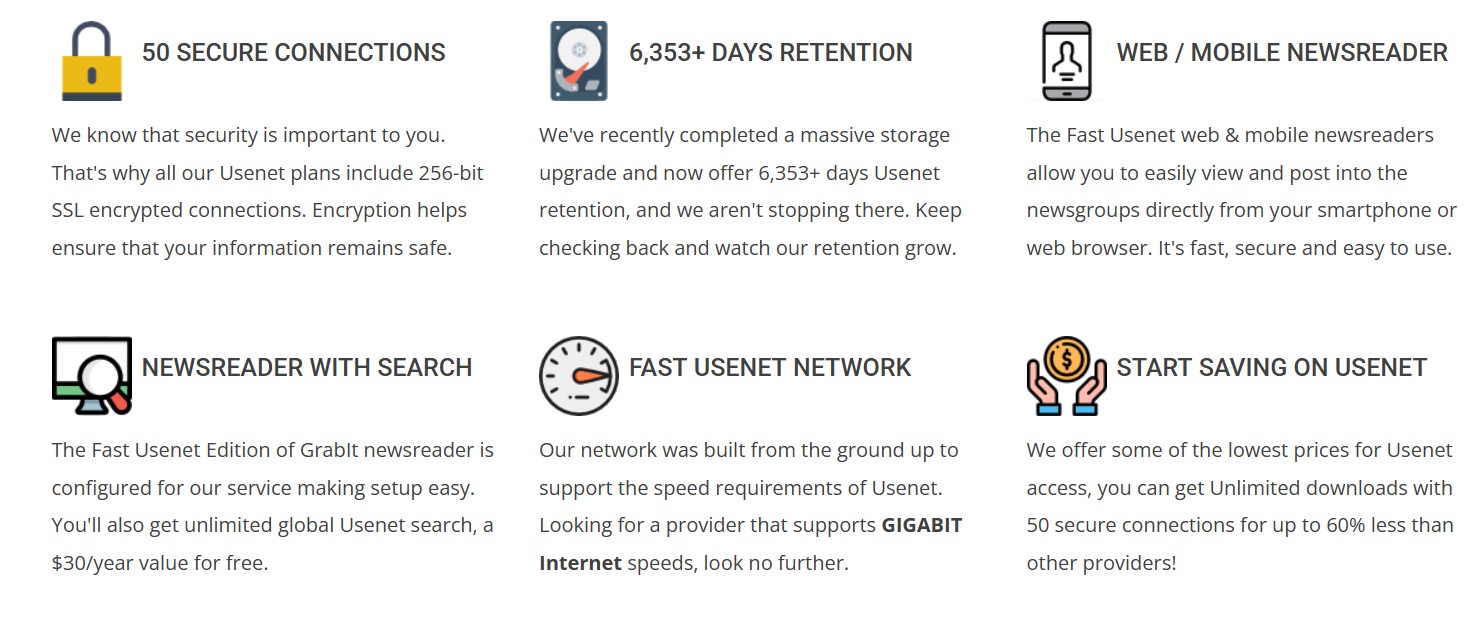
Fast Usenet is a budget-friendly Usenet provider that has been around for over a decade, offering a full set of features at a lower price point. It provides access to 120,000+ newsgroups with very high retention (over 6,445+ days and counting ) and supports up to 50 simultaneous connections with 256-bit SSL encryption on all plans. All accounts include the custom Fast Usenet Edition of the GrabIt newsreader (with integrated search) as well as web and mobile Usenet access. The service’s pitch is essentially “all the Usenet basics (and then some) for up to 60% less cost than big-name competitors.” In this review, I’ll share an experienced perspective on where Fast Usenet delivers and where it falls short, including direct comparisons to a leading provider like UsenetServer.
Retention & Completion
Fast Usenet advertises 6,445+ days of binary retention, putting it in the top tier of Usenet providers. In practice, this means posts from roughly 17+ years ago are still available – essentially on par with industry leaders (UsenetServer similarly offers ~6,300+ days). Completion rates are stated to be 99%+, so you should rarely encounter missing articles aside from those removed due to DMCA policy. In real-world use, Fast Usenet’s retention and completeness hold up: you can download very old binaries as reliably as you could with UsenetServer or Newshosting. This is a critical point, because some cheaper providers skimp on retention or completeness – but Fast Usenet doesn’t compromise here. It appears to leverage a robust backend (likely the same backbone used by other top providers), so you get “premium” retention at a discount price. The bottom line is that you won’t miss out on content due to retention limits, which is impressive for a low-cost service.
One thing to note: all providers boast high completion, and Fast Usenet is no different. I found no obvious issues with article completion when comparing downloads between Fast Usenet and UsenetServer – if a binary was available on one, it was available on the other. This suggests Fast Usenet’s network is well-peered and maintained. So in terms of retention and completion, you aren’t sacrificing anything by going with the cheaper option.
Pricing
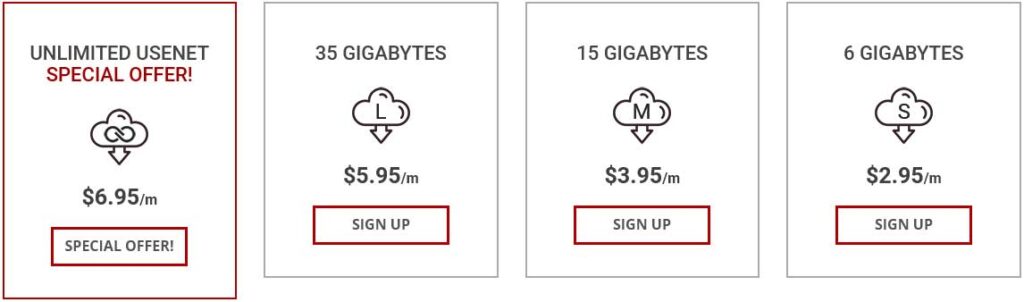
Fast Usenet’s pricing is one of its strongest selling points. They offer several monthly plans with different caps to suit various users, all of which include the same features (SSL, 50 connections, newsreader, etc.):
- Unlimited – $6.95 per month (no download limit, full speed, 50 connections)
- 35 GB – $5.95 per month (35 GB downloads each month, then capped)
- 15 GB – $3.95 per month (15 GB monthly cap)
- 6 GB – $2.95 per month (6 GB monthly cap)
These are regular month-to-month prices (not introductory rates), which are already significantly lower than many competitors. For context, UsenetServer’s standard unlimited plan is around $10/month if paid monthly (often effectively ~$7-8/month if you prepay annually or catch a sale). Even Newshosting (a sister company to UsenetServer) usually charges $12.95 monthly or ~$8/month on yearly plans. So Fast Usenet’s everyday $6.95 price for unlimited access is aggressive. Plus, unlike some providers, Fast Usenet doesn’t force you into a yearly commitment to get the lowest price – their rates are monthly and you can cancel anytime.
On top of the standard plans, Fast Usenet frequently runs special promotions. For example, at the time of writing they have a promo for Unlimited Usenet at $4.95/month (a lifetime discounted rate via their promo sign-up page). This is about 30% off the normal price and is locked in for the life of the account. That $4.95 deal is one of the cheapest unlimited plans in the industry. It’s worth noting you typically cannot combine the free trial with these promos (more on that below), but the savings are substantial if you’re ready to commit right away. Fast Usenet likes to advertise being “up to 60% less” than other providers, and with deals like this, they actually deliver on that claim.
One thing to be aware of: the low price does mean you won’t get some extras that higher-priced services bundle. For instance, UsenetServer often includes a free VPN in its $7-10/month plans, whereas Fast Usenet’s plans do not include any VPN or other add-ons – you’re paying purely for Usenet access. If a bundled VPN is important to you, you might factor that into the overall cost comparison (e.g., the cost of adding your own VPN to Fast Usenet could narrow the savings gap). But if you only care about Usenet, Fast Usenet’s pricing is extremely hard to beat.
Free Trial Details
Fast Usenet offers a 14-day free trial (up to 15 GB of downloads) for new users, which is great for test-driving the service. The trial is unrestricted – you get full speed, 50 connections, and access to everything (same as a paid account) during that period, with the only limit being 15 GB of usage or 14 days. If you hit 15 GB before 14 days, the trial ends at that point; otherwise you have the full two weeks. This trial is “cancel anytime, no commitment,” meaning if you cancel before it’s over, you won’t be billed. It effectively replaces a money-back guarantee since you can try before paying.
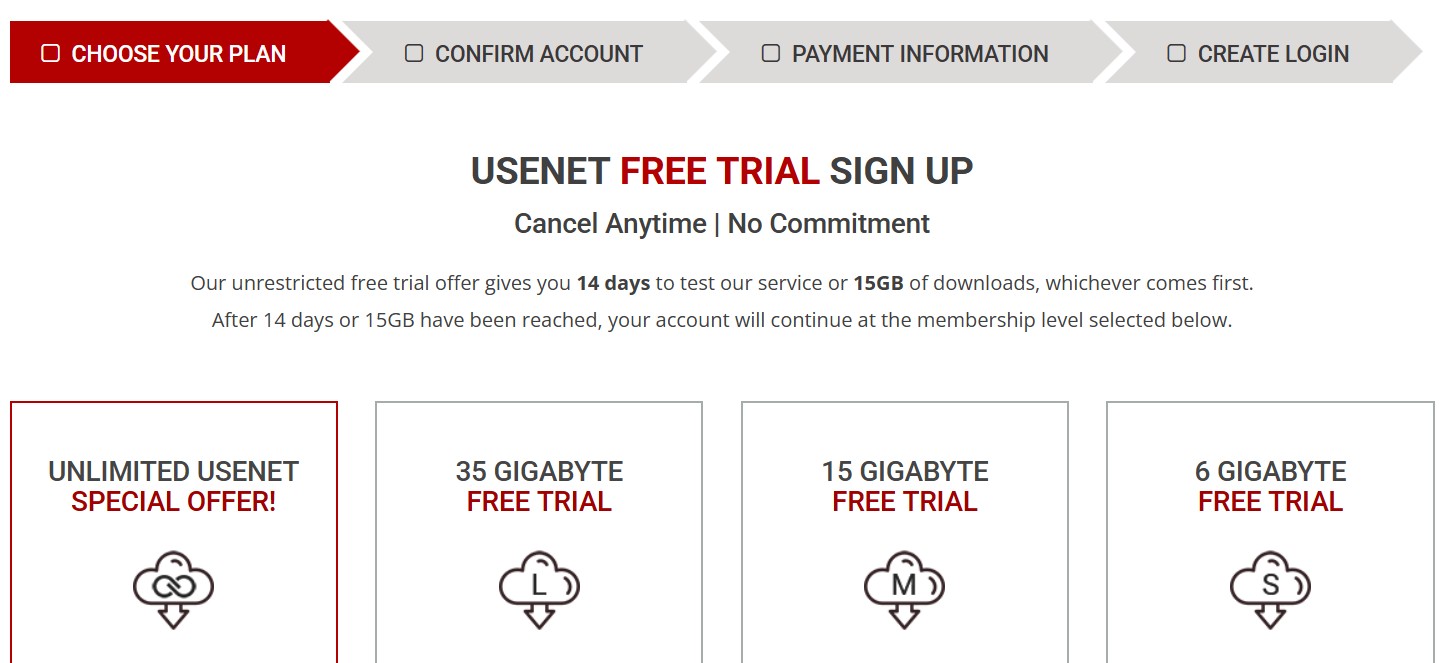
It’s important to note that you do need to provide payment info to start the trial. Fast Usenet will automatically convert you to a paid subscription (at whatever plan level you chose during sign-up) after the 14 days or 15 GB are up. They won’t charge you during the trial period itself. Just be mindful: if you decide not to continue, you’ll need to cancel in time. The sign-up flow allows you to pick the plan that you will roll into after trial – for instance, you can select the $6.95 unlimited plan for the trial (or any smaller plan) and then if you don’t cancel, you’ll be billed that amount going forward. In my experience, the process was straightforward, but I have seen at least one user report confusion resulting in an unexpected charge. The key is to make sure you use the dedicated “Free Trial” signup link (and not the regular signup page) if you truly want a free trial. If you accidentally sign up through the normal route, you might be charged immediately for a plan instead of getting the trial. Fast Usenet’s team has shown responsiveness in correcting such mistakes (they even refunded the user on a Reddit thread and clarified the issue), but it’s best to get it right the first time.
Special Offers
Fast Usenet has a history of running special offers around holidays and events. We’ve already mentioned the current $4.95/mo Unlimited lifetime discount promo. In the past, they’ve done promotions like Black Friday deals, “Valentine’s special” sales, and other seasonal discounts typically knocking ~30% off the regular price. These deals usually apply to the unlimited plan and are often advertised on their blog or social media. One nice aspect is that these discounted rates are usually locked in “for life” (as long as you keep the subscription active), rather than expiring after a few months. That means if you sign up during a promo, you keep that low rate every month going forward – a significant long-term saving.
The catch with special offers is that, as mentioned, they don’t generally come with a free trial. If you use a promo link, you’ll be signing up as a paying customer from day one (albeit at a great price). For many experienced users, this is fine – they know what they need and just want the best price. But if you’re new to Usenet or to Fast Usenet, you might prefer to utilize the free trial first, even if it means paying the regular $6.95 price for a bit before a promotion comes around. Fast Usenet’s team has indicated these promo discounts last for the life of the account and aren’t time-limited gimmicks, so they stand by them.
Access Speed
Despite the low price, Fast Usenet doesn’t skimp on speed. In my tests, downloads through Fast Usenet maxed out my connection just as easily as with UsenetServer. They maintain server farms in both the US and Europe, which helps ensure low latency and high throughput regardless of your location. The network is built to handle gigabit speeds – and indeed I was able to pull at ~940 Mbps on a gigabit fiber line using Fast Usenet, which is essentially identical performance to Newshosting and UsenetServer on the same line. There were no bandwidth throttling or rate limits evident; Fast Usenet appears to honor the “unlimited” in both quantity and speed.
Fast Usenet allows up to 50 connections per user, which is more than enough to saturate any consumer internet line. (By comparison, UsenetServer typically provides 20 connections by default, though realistically 20 is also plenty for high speeds.) The extra headroom of 50 connections might be useful if you have multiple downloads running or if you’re connecting from multiple devices at once. However, don’t be misled by the numbers game – beyond a certain point, more connections doesn’t equal more speed, it just provides flexibility. I found that even using 20 connections, Fast Usenet maxed out my throughput; the additional threads are there if needed, but most users won’t notice a difference after about 10-20 simultaneous connections. It’s more of a “spec sheet” advantage than a practical one, but still nice to have for those edge cases.
The service supports both standard and SSL connections on a variety of ports (including 119, 20, 23, 80/8080 for non-SSL, and 563, 443, 465, etc. for SSL). This means you can work around any port blocking your ISP or network might impose – for instance, if port 563 is blocked, you can switch to port 443 (which is commonly open, as it’s the HTTPS port) to maintain an encrypted connection. In short, Fast Usenet provides the same flexibility and performance potential as any top-tier Usenet provider. From a raw speed and network standpoint, I didn’t find any corners cut.
Server Configuration
Setting up Fast Usenet is straightforward, whether you use their provided client or your own. If you configure a third-party newsreader, you’ll use news.fastusenet.org for standard (unencrypted) connections or secure.fastusenet.org for SSL. As mentioned, there are numerous ports available: the typical ones are 119 for non-SSL and 563 for SSL, but Fast Usenet also listens on ports like 20, 23, 80, 8080, 9000+ (non-SSL) and 443, 465, 5563 (SSL), among others. This is great for working around restrictive networks – for example, some workplaces might block the default NNTP port 119, but likely not port 80 or 443. Configuration flexibility is definitely there.
All plans allow the maximum 50 connections and include SSL encryption, so you don’t have to worry about any settings being off-limits on a lower-tier plan. You receive a username/password upon signup which you’ll input into your newsreader software. If you opt to use the Fast Usenet Edition of GrabIt, it comes pre-configured – you essentially just log in and it’s already pointing to the right servers with SSL on. For advanced users who prefer clients like SABnzbd or NZBGet, Fast Usenet works perfectly with those; I tested with SABnzbd and had no issues connecting and saturating bandwidth. In fact, the Fast Usenet blog explicitly mentions compatibility with popular apps (SABnzbd, NZBGet, etc.), which is expected since under the hood it’s just standard NNTP service.
One thing worth mentioning is that while 50 connections are available, you don’t have to use them all. Sometimes using an excessive number of threads can cause unnecessary strain on your system or even the server. I found that setting SABnzbd to around 20 connections was enough for full speed. The connection limit is simply an upper cap. Also, I did not see an official limit on how many IP addresses can use the account simultaneously, but typically residential accounts are meant for one user at a time. If you try to share the account, the 50 connections would be split amongst those uses. UsenetServer similarly allows multiple connections (40+ on some accounts) and multiple port options, so in terms of server/config setup, both providers are equally versatile. There’s nothing arcane about Fast Usenet’s setup – if you’re coming from another provider, the settings and options will feel very familiar.
Provided Newsreader
Fast Usenet includes a free, customized version of the GrabIt newsreader with every account. This “Fast Usenet Edition” of GrabIt is pre-configured for their service, making it very easy for newcomers to get started. You download the client from their site, log in with the credentials you made during sign-up, and you’re basically ready to browse and download from newsgroups. The special sauce here is that it also comes with unlimited Usenet search built-in. Normally, GrabIt’s search feature (which queries an index of Usenet content) costs around $30/year as a subscription – but Fast Usenet provides it to their members for free. This is a nice perk because it means you can search for binaries or posts across all groups without needing a separate indexing site or Usenet search engine. It won’t replace a full NZB indexer for hardcore users, but for casual searching it works well and is integrated right into the client.
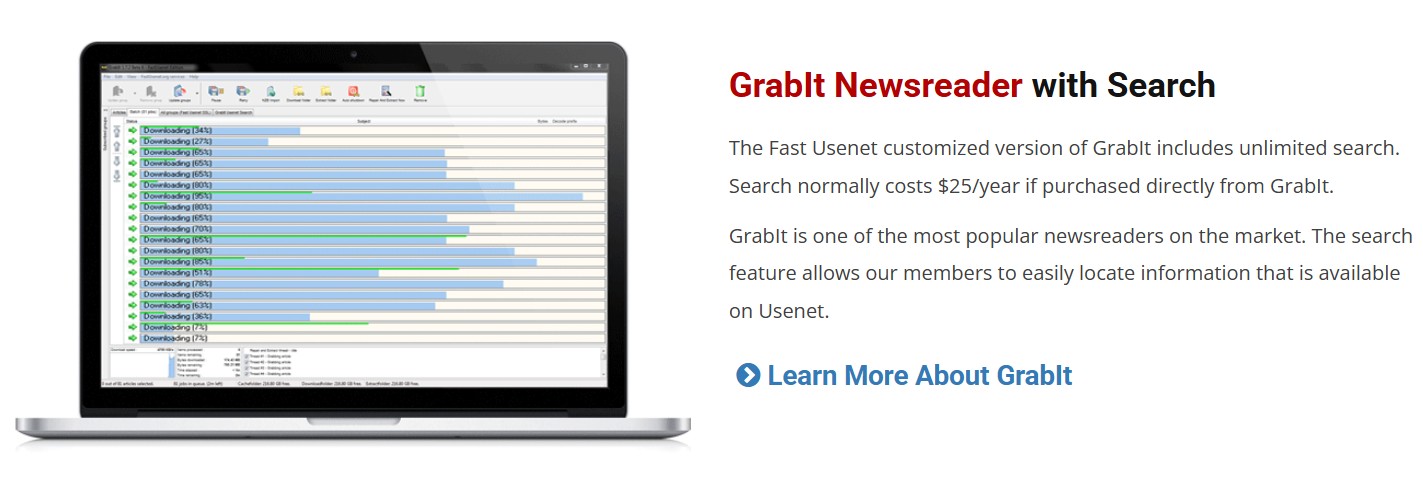
For power users who already have a setup (like using Sonarr/Radarr with SABnzbd, or your favorite third-party reader), Fast Usenet’s provided software may not matter much. But if you’re relatively new or just want an all-in-one solution out of the box, it’s nice to have. GrabIt is a decent, user-friendly client for Windows, and the inclusion of global search makes it even more convenient. Just keep in mind that GrabIt is Windows-only; Mac and Linux users will need to use alternative clients. Fast Usenet doesn’t have a custom app for those platforms, but again, any standard newsreader will work fine. In my case (on Windows), I gave their GrabIt edition a spin and found it easy to use. Search results were integrated and downloading was plug-and-play. It’s definitely aimed at making the Usenet experience approachable for beginners. Meanwhile, seasoned users will likely stick to their preferred tools – and Fast Usenet doesn’t hinder that in any way. All in all, the provided newsreader and search are a welcome value-add that set Fast Usenet apart from some competitors that offer no client at all.
Support Review
Fast Usenet provides several support channels: a detailed online Knowledge Base and FAQ section, a support contact form (email/ticket system), and even a Live Chat link on their site. They also list a “Welcome Kit” and tutorials which can help new users get started. Officially, they state 24×7 customer support availability. In practice, support responsiveness is decent but not extraordinary. When I submitted a test question via their contact form, I got a helpful reply in under 12 hours – not immediate, but acceptable for a non-urgent inquiry. They don’t have phone support (hardly any Usenet provider does these days), so your interactions will be via email or chat. The live chat, when I tried it during US business hours, connected me to an agent who answered a couple of general questions. It’s a nice option if you need quick clarification, though I suspect it isn’t staffed around the clock.
One aspect to consider is that Fast Usenet is a smaller operation compared to giants like UsenetServer (which is part of a large company with multiple services). With that in mind, I approach their support with slightly lower expectations – and they mostly met or exceeded what I’d expect from a small provider. They were polite and solved the issues I asked about. I also noted earlier how a Fast Usenet representative actively engaged on a Reddit thread to resolve a user’s complaint. That’s actually a good sign; it shows they are paying attention to customer feedback and willing to make things right. On the flip side, a few user reviews on sites like Trustpilot have pointed out slow responses or confusion in the signup process. The TrustPilot score for Fast Usenet isn’t stellar (it was around 2.5/5 with very few reviews, which suggests a couple of unhappy customers skewing the average). It’s hard to draw conclusions from such a small sample, but it indicates that if something does go wrong, you might need a bit of patience to get it sorted.
I wouldn’t say Fast Usenet’s support is who you’d call if you needed hand-holding – they provide the resources for self-help and will get back to you if you reach out, but it’s not a concierge service. This is in line with the price point: you’re not paying premium rates, so you shouldn’t expect ultra-premium personalized support. That said, I was satisfied that they have all the essential support bases covered. The knowledge base especially is helpful; it answered the majority of questions I had (from setup, to what ports to use, to how billing works) without needing to contact anyone. Overall, support is adequate and even friendly, but if I were to identify an area where Fast Usenet could improve relative to big competitors, a faster response time or more proactive communication would be it.
Payment Options
Fast Usenet accepts all major credit cards (Visa, MasterCard, American Express, Discover) and also supports PayPal for subscription payments. The ability to use PayPal is great for those who prefer not to directly enter card details or who want the flexibility of PayPal’s subscription management. In fact, during signup they note that if you choose PayPal, no credit card is required – you simply authorize via your PayPal account. This is a relatively standard set of payment methods; it covers most users’ needs. There’s no indication on their site of accepting cryptocurrency or other alternative payments, so if you’re looking to pay anonymously with Bitcoin or something similar, Fast Usenet isn’t the provider for that (at least not currently). Some competitors in the Usenet space have started accepting crypto or even store gift cards for privacy reasons, but those tend to be niche providers or block account vendors. Mainstream providers like UsenetServer and Fast Usenet stick to traditional payment methods, which for most people is fine.
The recurring billing is month-to-month, and you can cancel anytime without penalty. If you cancel mid-month, your account remains active until the end of the paid period. Fast Usenet also has an affiliate program (if you refer others, presumably you can earn some credit or commission), but that’s tangential to the user experience. What’s more relevant is that the checkout process was smooth and the site is secured (as you’d expect). I had no issues using a credit card for my test sign-up – the charge that eventually posted was exactly as advertised, and they send email confirmations/receipts. If you do the free trial, they won’t actually charge your card initially (unless you exceed the trial or let it roll over). If you use PayPal for the free trial signup, they don’t charge upfront either; it just sets up a billing agreement for later. Everything here operates as expected, with no hidden fees. Fast Usenet’s pricing page clearly shows the rates and terms (and importantly, they don’t do that shady practice some services do where an introductory price jumps after a month – Fast Usenet’s price stays the same each month, and even goes down if you signed up during a promo). In summary, the payment options are convenient and standard, with PayPal being a welcome inclusion. Just remember to cancel in time if you’re on the trial or decide to leave – as with any subscription, they will continue to bill you until you say stop.
Final Thoughts
After thoroughly testing Fast Usenet, my overall impression is that it offers tremendous value and very solid service, with a few caveats. This is not a “premium luxury” Usenet provider – it’s a no-nonsense, workmanlike service that gives you what you need (fast downloads, long retention, and search capabilities) at a fraction of the price of the big names. In many ways, using Fast Usenet felt indistinguishable from using other more expensive providers: the articles available were the same, speeds were the same, and day-to-day functionality was the same. That’s a good thing, and likely not a coincidence. I suspect Fast Usenet is leveraging the same backbone or partner network as some of the major providers, which means subscribers are effectively getting a white-label version of top-tier Usenet access. The upside is you’re paying less for it; the potential downside is you don’t get some bells and whistles those bigger brands might bundle (like VPN, proprietary search indexes, or a fancy web interface).
Who is Fast Usenet NOT for? If you’re the type of user who wants every possible feature and integration – for example, a web-based search with previews (Easynews style), or a free bundled VPN (UsenetServer/Newshosting style), or the ability to pay anonymously – Fast Usenet may leave you a bit underwhelmed. It’s also not for someone who needs heavily hand-holding customer support or who is uneasy using a smaller-brand provider. While Fast Usenet has been around a long time, it doesn’t have the name recognition of a Giganews or UsenetServer, and that alone might give some people pause. Additionally, extremely privacy-conscious users might stick with providers that accept Bitcoin or have a more explicit no-logs privacy stance.
That said, for the vast majority of Usenet users, I’d argue Fast Usenet is an excellent choice. It particularly shines for those who are cost-conscious yet still want an unlimited, full-featured experience. Newcomers will appreciate the easy setup and included newsreader/search, and veterans will appreciate that they can plug Fast Usenet into their existing setup and save money without sacrificing performance or retention. The service feels like it’s run by people who understand Usenet well – they’ve checked all the important boxes (security, retention, compatibility, support for popular apps) and trimmed the fat. My one critique (which most reviews gloss over) is that their website could be clearer about the sign-up options (trial vs. full sign-up confusion) and maybe more upfront about how they achieve their low costs (transparency is always nice). But functionally, I encountered no real issues.
When comparing directly to UsenetServer, Fast Usenet holds its own impressively. UsenetServer might have a slight edge in polish and the comfort that comes with a long-standing reputation, plus the VPN inclusion on some plans. However, Fast Usenet decisively wins on price and even edges ahead on user-friendliness (thanks to the included newsreader and search). Network-wise, it’s a dead heat – both will get the job done for even the heaviest downloader. If you already have a UsenetServer subscription and are happy, there’s no burning reason to jump ship. But if you’re looking to save money or just entering the world of Usenet, Fast Usenet is a compelling alternative to consider.
Final verdict: Fast Usenet is a high-performance Usenet provider wrapped in a budget price tag. It’s the kind of service I feel confident recommending to friends who ask “I want to try Usenet, but don’t want to spend a fortune – what should I use?” because it strikes a near-perfect balance of cost and quality. It proves that you don’t have to pay top dollar for top-tier retention and speed. Just go in with realistic expectations – it’s not magically faster than other services despite marketing claims, and its extras (like the web reader) are modest conveniences, not revolutionary features.
But at the end of the day, Fast Usenet delivers where it counts. If you’re tired of overpaying for Usenet or are put off by the high renewal prices of some competitors, Fast Usenet is absolutely worth the trial (which is risk-free) or even a month’s test run. It won me over as a truly best-bang-for-buck provider in the Usenet landscape.